Site audit
A polite crawler audits your site for broken links, missing tags and slow pages, scores it, and ranks every issue by the traffic it touches.
What the audit does#
Watch: Core Web Vitals + SEO audit: fix what matters first (2:14)
Core Web Vitals from real visitors and an SEO audit ranked by real traffic, so you fix the slow checkout everyone uses before the broken page nobody visits.
Transcript
Your SEO tool found four hundred issues. Your speed test says your site is fine. Both are wrong about what to fix first.
I'm James, founder of Privatus Analytics. Let me show you the one list that's in the right order.
Here's a Tuesday you've probably had. You run a speed test. Green score. You run an audit. Four hundred issues, all marked urgent. You pick one and spend the day on it. The page you fixed gets twelve visits a month. Meanwhile your checkout is slow on the phones your customers actually use, and the audit never mentioned it, because the audit has never seen a single visitor. The speed test didn't catch it either. It ran once, on a fast computer, on a good connection. Your customers aren't on that computer. So the hours go in and the sales don't move. And Google is ranking you on the real-world speed your customers feel, not on the green score. The tools that do measure real users often do it by fingerprinting them or dropping a cookie, so you're back to a banner for a speed number.
Privatus Analytics measures speed from your real visitors, with the script already on your site, and without identifying any of them. You get the three numbers Google looks at, measured on real visits, marked good, needs work or poor. Then it ranks your pages by how much slowness they cause, weighted by how many people visit them. The slow checkout everyone uses goes to the top. The slow page nobody visits goes to the bottom. The audit works the same way. It checks your whole site like a search engine would, gives you one score out of a hundred, and because it knows your traffic, the issues on your busiest pages come first. That's the part other audits can't do. They've never seen your visitors. After every audit you see what's new and what's fixed, so you know if your last change helped or hurt.
No more drowning in a list of four hundred. You fix the page that's costing you the most, first. And your site gets faster for the people who actually buy.
Find out what to fix first. Start free at privatusanalytics.com.
The site audit crawls your site the way a search engine does. It follows
links from the home page, reads your robots.txt and sitemaps, and runs
a list of checks on every page it reaches. When it finishes you get:
- a score from 0 to 100,
- the issues it found, as errors, warnings and notices,
- what is new and what was fixed since the audit before,
- and every issue ranked by the pageviews of the pages it touches, because Privatus Analytics already knows which pages people visit.
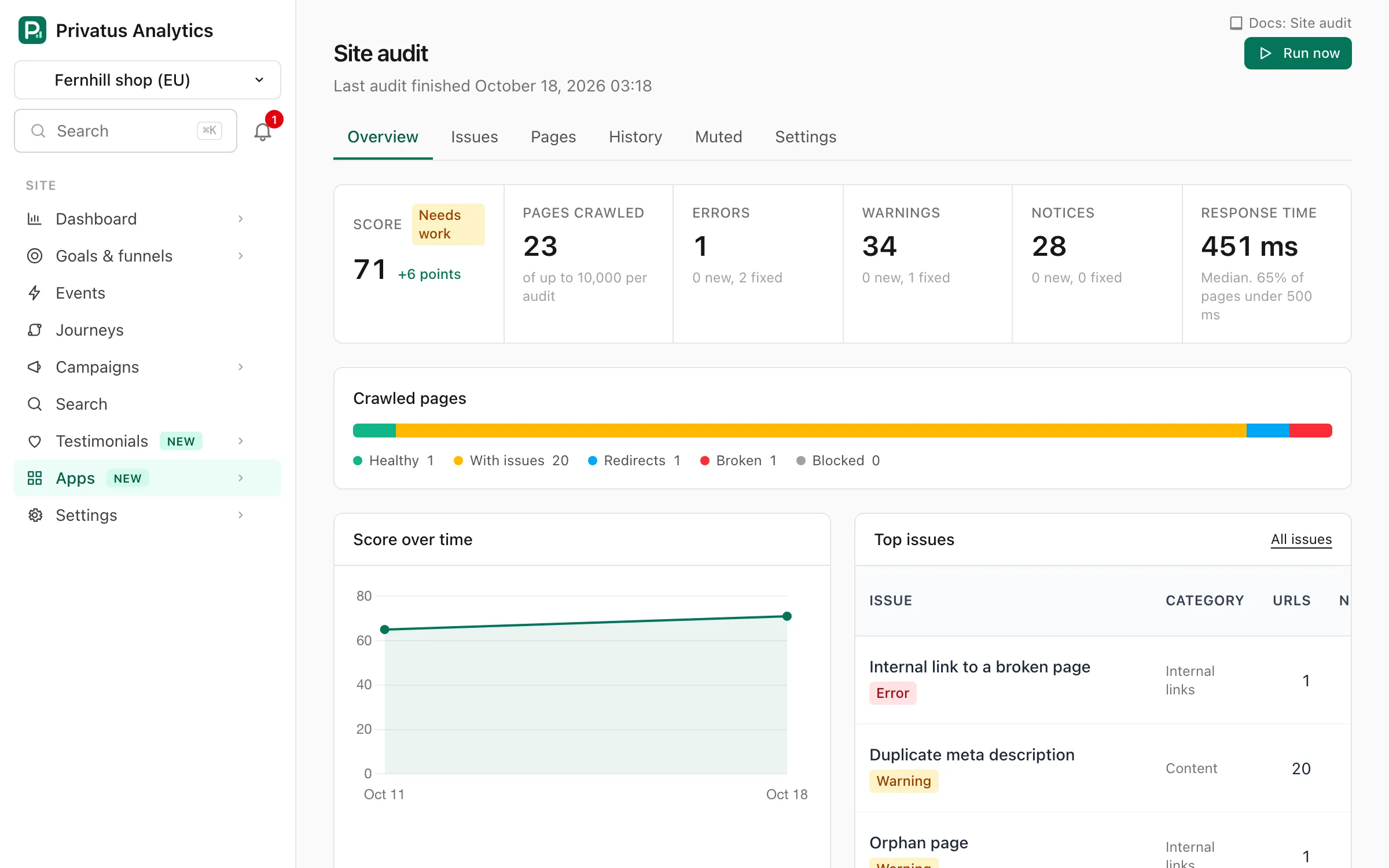
Every site is audited by default. The first audit starts when the site is added. Open Site audit from the site's Apps page to see the results.
Audited pages never count as events, and audits keep running while collection is paused at the monthly limit.
Schedule and limits#
Each plan sets how many pages one audit crawls and how often a site is audited. The numbers are the Site audit pages per audit and Site audit interval (days) rows of the table on the Plans page.
- The page allowance counts HTML pages on your site. Images, scripts, stylesheets and links to other sites are checked too and do not count.
- When a crawl stops at the allowance with pages left, the overview says how many pages were found and how many were audited.
- An audit keeps track of up to 10 times as many pages as the allowance of your plan. On a larger site the number of pages found stops there, and pages past it are not listed.
- An audit never crawls more than 10,000 pages, on any plan.
- Run now starts an audit by hand. On a paid plan you can start one every 24 hours. On the Free plan a manual audit takes the place of the scheduled one, so there is one audit per interval.
- Only one audit runs per site at a time. Cancel audit stops it, and nothing of the unfinished crawl is kept.
Crawler#
The audit is run by our own crawler, PrivatusAuditBot. It sends this
User-Agent:
Mozilla/5.0 (compatible; PrivatusAuditBot/1.0; +https://privatusanalytics.com/docs/features/site-audit#crawler)
It is built to be gentle with your server:
- It fetches one page at a time per site, over one kept-alive connection, and waits between requests.
- It reads
robots.txtfirst and obeys it, following the rules forPrivatusAuditBotand then the rules for*. - It honors
Crawl-delay, up to 10 seconds. - When your server responds with
429or503it backs off, obeysRetry-After, and gives up politely if the site keeps refusing. That audit ends as Partial with the reason shown. - It only requests pages. It never submits forms, never logs in and never runs your JavaScript.
To slow the crawler down, add a crawl delay to robots.txt:
User-agent: PrivatusAuditBot
Crawl-delay: 5
To keep it out of part of the site:
User-agent: PrivatusAuditBot
Disallow: /internal/
To block it completely, use Disallow: /. The next audit then fails
with a note that robots.txt does not allow the crawler. You can also
turn the audit off in its settings.
If a firewall or bot protection blocks the crawler, allow the
PrivatusAuditBot user agent there.
Scope and subdomains#
The crawl starts at the site's home page. If the home page redirects
(for example from example.com to www.example.com), the crawler
adopts the final address. The apex domain and www always count as the
same site.
By default the crawler also follows links to subdomains of the
site's domain, such as blog.example.com. Turn that off in the
settings to stay on one host. Everything else is an external link. An
external link is checked once with a light request to see whether it
still works, and its page is never crawled.
Besides links, the crawler picks up URLs from your sitemaps and from the pages that got pageviews in your analytics, so pages that nothing links to are found too.
A few things are left out so the report stays about your pages:
- Files are not pages. A link to a PDF, a Markdown file or a feed is checked to see that it works, and is not counted, scored or checked as a page.
- Every language version needs its own sitemap entry. A URL that
another entry only names as an
xhtml:linkalternate is reported as missing from the sitemap, because search engines want each translation listed as its own<url>with the alternates on it. - Cloudflare's own URLs are skipped. Links and scripts under
/cdn-cgi/(email protection, for example) are added by Cloudflare, not by your site. - A link is only broken if it fails twice. Some servers respond to the light request with an error for a page that works, so an error is asked again with a full request before it is reported.
What is stored#
The audit stores metadata about your pages: the URL, status code, response time and size, title, meta description, first H1, canonical, robots directives, language, hreflang, structured data types, social tags, a short list of response headers, word count, link counts and the links between pages.
It never stores the text or the HTML of a page. Content is read in memory to count words and to detect duplicates with a hash, and then dropped. Nothing about your visitors is involved.
The pages, links and findings are kept for the two latest finished audits of a site. Older audits keep their score and their totals per check, so the trends still have their history.
Score#
The score is a public formula:
score = 100 x (1 - (E + 0.3 x W) / N) - 5 x S
Nis the number of pages crawled on your site.Eis the number of pages with at least one error.Wis the number of pages with warnings and no error.Sis the number of site-level errors (such as an unreachablerobots.txt), counted up to 4, so they cost at most 20 points.
Notices never change the score. A score of 90 or more is Good, 70 to 89 Needs improvement, and anything lower Poor. Muted checks are left out.
Overview#
The overview shows the latest finished audit:
- the score with its band and the change since the audit before,
- pages crawled, and errors, warnings and notices, each with what is new and what was fixed,
- the crawled pages split into healthy, with issues, redirects, broken and blocked,
- the cache hit rate (see below),
- the score over time,
- the top issues, ordered by severity and then by the pageviews of the pages they affect,
- a card per category with its own score,
- status codes, click depth and response times,
- and what the crawler read in
robots.txtand your sitemaps.
While an audit runs, the page shows how many pages were crawled so far and updates by itself. The results of the audit before stay visible below. A failed audit shows why it failed.
Cache hit rate#
The cache hit rate is the share of your pages that a CDN or server
cache responded when the audit asked for them. It is read from the
response headers each provider sends, such as cf-cache-status
(Cloudflare), x-cache (CloudFront, Fastly, Akamai, Azure),
x-vercel-cache, cdn-cache (Bunny) and the standard cache-status.
Any header whose name ends in cache, cache-status or cache-hits
is read, so other caches are picked up too.
- Served from cache: a hit, or a stored copy that was revalidated or served while it is refreshed.
- Not served from cache: a cache responded, and it had to ask your server (a miss, an expired copy, or a page it does not cache).
- No cache header: nothing on the way said either. These pages are left out of the percentage.
Each of the three shows the median response time of its pages, so you can see how much faster a cached page responds than one your server had to build. It is the time the crawler waited for the page, from one place, and a row with no pages shows no time.
The rate is green at 80% or more, yellow from 50% and red below. It is one request per page from one place, so a page nobody asked for lately can be a miss in the audit and a hit for your next visitor. It does not change the score.
Issues#
Issues lists one row per check that found something: the number of URLs affected, how many are new, how many were fixed, and the pageviews those pages got in the 30 days before the audit. Filter by severity, by category, or to new issues only.
Open an issue to read why it matters and how to fix it, and to see every affected URL. Sort the URLs by pageviews to fix the pages people visit first. CSV downloads the list.
Pages#
Pages is the explorer of everything the crawler saw. Filter by status code, crawl state, indexable or not, in the sitemap or not, with or without issues, click depth, or text in the URL or title. Sort by pageviews, links in, depth, response time or word count. The Resources and External links tabs list the images, scripts, stylesheets and outbound links that were checked.
Open a page to see every stored field, its issues, the first 100 links in and out with their anchor text, and where it redirects to. Page analytics opens the same page in your analytics, and the analytics page detail links back to the audit.
History and compare#
History lists every audit of the site with its status, score and counts. Open a finished audit to see its overview.
Compare two audits shows, per check, the URLs affected before and after and what was added and fixed. For an audit and the one right before it these are the exact new and fixed URLs. For audits further apart they are the net change.
Muting#
Some findings are on purpose. Mute this check on an issue page hides the check for the whole site. Mute next to a URL hides the check for that URL only. Muted findings are still recorded, but they stay out of the counts, and out of the score from the next audit on. Muted lists every mute and lets you remove it.
To mute many at once, tick the boxes and choose Mute selected: on an
issue page it mutes the check on the ticked URLs, and on the Issues list
it mutes the ticked checks for the whole site. The box in the table
header ticks every row on the page. The list updates in place, so you
keep your position while you work through it. Over the API and MCP,
site_audit_mutes_bulk does the same with up to 100 URLs or checks in
one call.
Muting needs the content.write permission.
Email#
When an audit finishes, the workspace's owners and admins who can see the site get a summary by email: the score, what is new, what was fixed and the top issues, with a link to the audit.
When the audit found errors or warnings, the email also has a prompt you can paste into Claude, ChatGPT, Cursor or another AI assistant connected over MCP, so the assistant reads the audit and fixes the issues in your code.
To stop it for one site, use the unsubscribe link in the email or Turn off under Audit summary emails on the audit overview. To stop it for every site, untick Site audit summary emails on your account page.
Settings#
Settings on the audit page, and the Site audit tab of the site
settings, hold the same form. Changing it needs the sites.manage
permission.
| Setting | What it does |
|---|---|
| Audit this site on a schedule | Turns the audit on or off. Off also disables Run now |
| Follow links to subdomains | Crawls subdomains of the site's domain. On by default |
| Check links to other sites | Checks that outbound links still work. On by default |
| Paths to skip | Paths the crawler does not fetch, one per line, each starting with a slash |
| Query parameters to ignore | Parameters that never make a different page, such as sort. Tracking parameters like utm_source are always ignored |
| Extra start URLs | Full URLs to crawl as well as the home page, for pages nothing links to |
Checks#
Every check the audit runs today:
| Check | Category | Severity |
|---|---|---|
| Canonical tags point to different URLs | Crawlability | Error |
| Canonical in the header and in the tag differ | Crawlability | Error |
| Canonical loop | Crawlability | Error |
| Canonical tag is outside the head | Crawlability | Error |
| Canonical points to a missing page | Crawlability | Error |
| Canonical points to a page with a server error | Crawlability | Error |
| Content type is missing or wrong | Crawlability | Error |
| Head contains an element that belongs in the body | Crawlability | Error |
| Page that could not be reached | Crawlability | Error |
| Page on a host that does not resolve | Crawlability | Error |
| Robots directives contradict each other | Crawlability | Error |
| Robots meta tag is outside the head | Crawlability | Error |
| robots.txt could not be fetched | Crawlability | Error |
| Old AJAX crawling URL in use | Crawlability | Warning |
| Base tag has an invalid URL | Crawlability | Warning |
| More than one base tag | Crawlability | Warning |
| Base tag is outside the head | Crawlability | Warning |
| Canonical chain | Crawlability | Warning |
| Canonical tag is empty or invalid | Crawlability | Warning |
| Canonical points to another site | Crawlability | Warning |
| More than one canonical tag | Crawlability | Warning |
| Canonical points to the other protocol | Crawlability | Warning |
| Canonical points to a page blocked by robots.txt | Crawlability | Warning |
| Canonical points to the homepage | Crawlability | Warning |
| Canonical points to a noindex page | Crawlability | Warning |
| Canonical points to a redirect | Crawlability | Warning |
| Page is canonicalized and noindex at once | Crawlability | Warning |
| Character encoding is not declared | Crawlability | Warning |
| Doctype is missing | Crawlability | Warning |
| Page uses frames | Crawlability | Warning |
| Page is set to nofollow in the X-Robots-Tag header | Crawlability | Warning |
| Page is set to nofollow in a robots meta tag | Crawlability | Warning |
| Page is set to noindex in the X-Robots-Tag header | Crawlability | Warning |
| Page is set to noindex in a robots meta tag | Crawlability | Warning |
| Image, script or stylesheet blocked by robots.txt | Crawlability | Warning |
| More than one robots meta tag | Crawlability | Warning |
| robots.txt has lines that cannot be read | Crawlability | Warning |
| Canonical URL contains a fragment | Crawlability | Notice |
| Canonical is set in both the header and the tag | Crawlability | Notice |
| Canonical URL is missing | Crawlability | Notice |
| Canonical URL is relative | Crawlability | Notice |
| Canonical target has no internal links | Crawlability | Notice |
| Form submits with GET | Crawlability | Notice |
| Nofollow is set in both the meta tag and the header | Crawlability | Notice |
| Noindex is set in both the meta tag and the header | Crawlability | Notice |
| Page blocked by robots.txt | Crawlability | Notice |
| Robots meta tag has an unknown directive | Crawlability | Notice |
| No robots.txt file | Crawlability | Notice |
| Page could not be fetched | Redirects | Error |
| Page timed out | Redirects | Error |
| Redirect to a broken page | Redirects | Error |
| Redirect chain of four or more hops | Redirects | Error |
| Redirect from HTTPS to HTTP | Redirects | Error |
| Redirect loop | Redirects | Error |
| Soft 404 | Redirects | Error |
| Page returns a 4xx error | Redirects | Error |
| Page returns a 5xx error | Redirects | Error |
| Homepage does not redirect http to https | Redirects | Warning |
| Meta refresh tag | Redirects | Warning |
| Redirect chain | Redirects | Warning |
| Temporary redirect | Redirects | Warning |
| Refresh header in the response | Redirects | Warning |
| Site responds on both www and the bare domain | Redirects | Warning |
| Internal link redirected for letter case | Redirects | Notice |
| Internal link redirected for a trailing slash | Redirects | Notice |
| Redirect with no internal links | Redirects | Notice |
| Image, script or stylesheet that redirects | Redirects | Notice |
| Sitemap that cannot be read | Sitemaps | Error |
| Missing page in the sitemap | Sitemaps | Error |
| Page with a server error in the sitemap | Sitemaps | Error |
| Sitemap lastmod dates in the future | Sitemaps | Warning |
| Sitemap lastmod dates that cannot be read | Sitemaps | Warning |
| No XML sitemap found | Sitemaps | Warning |
| Page in the sitemap with no internal links | Sitemaps | Warning |
| Sitemap over the size limit | Sitemaps | Warning |
| Page in the sitemap blocked by robots.txt | Sitemaps | Warning |
| http URL in the sitemap | Sitemaps | Warning |
| Noindex page in the sitemap | Sitemaps | Warning |
| Non-canonical page in the sitemap | Sitemaps | Warning |
| Redirecting URL in the sitemap | Sitemaps | Warning |
| Page in the sitemap that timed out | Sitemaps | Warning |
| Sitemap URLs with no lastmod date | Sitemaps | Notice |
| Sitemap not named in robots.txt | Sitemaps | Notice |
| Indexable page missing from the sitemap | Sitemaps | Notice |
| URL listed in more than one sitemap | Sitemaps | Notice |
| Internal link to a broken page | Internal links | Error |
| Link points to a local address | Internal links | Error |
| Page with only nofollow internal links | Internal links | Warning |
| Link has no anchor text | Internal links | Warning |
| Link to the HTTP version of the site | Internal links | Warning |
| Internal link is nofollow | Internal links | Warning |
| Link URL is malformed | Internal links | Warning |
| Link has no real URL | Internal links | Warning |
| More than 1,000 links on the page | Internal links | Warning |
| Page has no internal links | Internal links | Warning |
| Orphan page | Internal links | Warning |
| Page more than three clicks from the homepage | Internal links | Warning |
| Page with both followed and nofollow internal links | Internal links | Notice |
| Page linked only from non-indexable pages | Internal links | Notice |
| Link has generic anchor text | Internal links | Notice |
| Internal link to a redirect | Internal links | Notice |
| Link URL is over 2,000 characters | Internal links | Notice |
| Page with only one internal link | Internal links | Notice |
| Paginated page with no internal links | Internal links | Notice |
| Broken image from another site | External links | Warning |
| External link to a broken page | External links | Warning |
| External link that redirects to a broken page | External links | Warning |
| Broken script from another site | External links | Warning |
| Broken stylesheet from another site | External links | Warning |
| Link opens a new tab without noopener | External links | Notice |
| External link that refused our crawler | External links | Notice |
| External link is nofollow | External links | Notice |
| Page has no visible text | Content | Error |
| Duplicate page with no canonical | Content | Error |
| Title tag is missing | Content | Error |
| Title tag is outside the head | Content | Error |
| Exact duplicate content | Content | Warning |
| Near duplicate content | Content | Warning |
| Thin content | Content | Warning |
| Duplicate meta description | Content | Warning |
| Meta description is missing | Content | Warning |
| More than one meta description | Content | Warning |
| Meta description is outside the head | Content | Warning |
| H1 heading is missing | Content | Warning |
| Placeholder text on the page | Content | Warning |
| Page uses a legacy plugin | Content | Warning |
| Duplicate title | Content | Warning |
| More than one title tag | Content | Warning |
| Title is too long | Content | Warning |
| Same page at more than one URL | Content | Warning |
| Meta description repeats the title | Content | Notice |
| Meta description is too long | Content | Notice |
| Meta description is too short | Content | Notice |
| Duplicate H1 heading | Content | Notice |
| More than one H1 heading | Content | Notice |
| H1 heading is too long | Content | Notice |
| No H2 headings | Content | Notice |
| Heading levels are skipped | Content | Notice |
| Low text to HTML ratio | Content | Notice |
| Title and H1 are identical | Content | Notice |
| Title is too short | Content | Notice |
| Broken image | Images | Error |
| Image has no alt attribute | Images | Warning |
| Image loaded over HTTP on a secure page | Images | Warning |
| Linked image has no alt text | Images | Warning |
| Image over 100 KB | Images | Warning |
| Image alt text is over 100 characters | Images | Notice |
| Image has no width and height | Images | Notice |
| Image uses a legacy format | Images | Notice |
| Page uses an image map | Images | Notice |
| Images further down the page are not lazy loaded | Images | Notice |
| JSON-LD cannot be parsed | Structured data | Error |
| Open Graph URL differs from the canonical | Structured data | Warning |
| Article structured data is incomplete | Structured data | Warning |
| Breadcrumb structured data is incomplete | Structured data | Warning |
| FAQ structured data is incomplete | Structured data | Warning |
| Organization structured data is incomplete | Structured data | Warning |
| Product structured data is incomplete | Structured data | Warning |
| Structured data has no type | Structured data | Warning |
| Structured data type is not valid | Structured data | Warning |
| No favicon link | Structured data | Notice |
| Open Graph tags are incomplete | Structured data | Notice |
| Open Graph tags are missing | Structured data | Notice |
| No structured data | Structured data | Notice |
| Twitter card tag is missing | Structured data | Notice |
| Hreflang has an invalid language or region code | International | Error |
| Hreflang link is outside the head | International | Error |
| hreflang to a broken page | International | Error |
| Page named under conflicting language codes | International | Warning |
| Hreflang lists a language more than once | International | Warning |
| hreflang with no return tag | International | Warning |
| Hreflang has no self reference | International | Warning |
| Hreflang URL is not absolute | International | Warning |
| Hreflang uses one URL for several languages | International | Warning |
| hreflang to a page blocked by robots.txt | International | Warning |
| hreflang to a noindex page | International | Warning |
| hreflang to a non-canonical page | International | Warning |
| hreflang to a redirect | International | Warning |
| Language and hreflang disagree | International | Warning |
| Language code is not valid | International | Warning |
| Language is not declared | International | Warning |
| Hreflang has no x-default | International | Notice |
| Page reachable only through hreflang | International | Notice |
| Hreflang is set but the language is not | International | Notice |
| Viewport meta tag is missing | Mobile | Error |
| Viewport has a fixed width | Mobile | Warning |
| Viewport does not use the device width | Mobile | Warning |
| Zooming is disabled | Mobile | Warning |
| Separate mobile URL | Mobile | Notice |
| Viewport initial scale is not 1 | Mobile | Notice |
| More than one viewport meta tag | Mobile | Notice |
| Very slow server response | Performance | Error |
| Broken JavaScript file | Performance | Error |
| Broken stylesheet | Performance | Error |
| HTML is over 2 MB | Performance | Warning |
| HTML is not compressed | Performance | Warning |
| Scripts or stylesheets served without compression | Performance | Warning |
| Slow server response | Performance | Warning |
| Layout shifts for real visitors (CLS) | Performance | Warning |
| Slow response to input for real visitors (INP) | Performance | Warning |
| Slow loading for real visitors (LCP) | Performance | Warning |
| More than 100 script and stylesheet files | Performance | Notice |
| Scripts or stylesheets with no browser caching | Performance | Notice |
| Certificate has expired | Security | Error |
| Certificate does not match the domain | Security | Error |
| Form submits to an HTTP address | Security | Error |
| Homepage not served over https | Security | Error |
| Mixed content | Security | Error |
| Page is served over HTTP | Security | Error |
| Password field on an insecure page | Security | Error |
| Certificate expires within 14 days | Security | Warning |
| Strict-Transport-Security header is missing | Security | Warning |
| Outdated TLS version | Security | Warning |
| Content-Security-Policy header is missing | Security | Notice |
| Protocol-relative resource URL | Security | Notice |
| Referrer-Policy header is missing | Security | Notice |
| X-Content-Type-Options header is missing | Security | Notice |
| Page can be framed by other sites | Security | Notice |
| Internal link has tracking parameters | URL structure | Warning |
| URL contains a double slash | URL structure | Warning |
| URL repeats a path segment | URL structure | Warning |
| Session ID in the URL | URL structure | Warning |
| URL contains spaces | URL structure | Warning |
| Internal search results can be indexed | URL structure | Notice |
| URL contains non-ASCII characters | URL structure | Notice |
| URL has an empty query string | URL structure | Notice |
| URL is over 200 characters | URL structure | Notice |
| URL has more than 4 parameters | URL structure | Notice |
| URL contains underscores | URL structure | Notice |
| URL contains uppercase letters | URL structure | Notice |
| AMP page has no canonical | Pagination | Error |
| Paginated page is canonicalized to page one | Pagination | Warning |
| Pagination URL is not linked on the page | Pagination | Warning |
| More than one next or previous page | Pagination | Warning |
| Paginated page is noindex | Pagination | Warning |
| AI crawlers blocked in robots.txt | AI search | Notice |
| Not modified in over 6 months | AI search | Notice |
| llms.txt is not in the expected format | AI search | Notice |
| No llms.txt file | AI search | Notice |
| Very long page | AI search | Notice |
| Little semantic HTML | AI search | Notice |
| Content security policy blocks the Privatus Analytics script | Traffic | Error |
| Broken page that still gets visitors | Traffic | Error |
| High-traffic page with errors | Traffic | Error |
| Page may depend on JavaScript | Traffic | Warning |
| Privatus Analytics script is missing | Traffic | Warning |
| Search or AI crawlers requesting a missing page | Traffic | Warning |
| Orphan page with traffic | Traffic | Warning |
| Non-indexable page with search clicks | Traffic | Warning |
| Page with traffic that the audit did not reach | Traffic | Notice |
| Redirecting page that still gets visitors | Traffic | Notice |
API and MCP#
Everything on these screens is in the JSON API and the MCP server. Add
.json to a page's address, or call the tool.
| Tool | Endpoint | What it does |
|---|---|---|
site_audit_get |
GET /sites/{site}/audit |
The overview. audit_id picks an older audit |
site_audit_history |
GET /sites/{site}/audit/history |
Every audit of the site |
site_audit_run |
POST /sites/{site}/audit |
Starts an audit now |
site_audit_cancel |
POST /sites/{site}/audit/cancel |
Cancels the running audit |
site_audit_compare |
GET /sites/{site}/audit/compare |
Two audits, per check |
site_audit_issues_list |
GET /sites/{site}/audit/issues |
One row per check |
site_audit_issues_get |
GET /sites/{site}/audit/issues/{check_key} |
One check and its URLs |
site_audit_pages_list |
GET /sites/{site}/audit/pages |
The page explorer |
site_audit_pages_get |
GET /sites/{site}/audit/pages/{id} |
One page in full |
site_audit_mutes_list |
GET /sites/{site}/audit/mutes |
Muted checks |
site_audit_mutes_create |
POST /sites/{site}/audit/mutes |
Mutes a check |
site_audit_mutes_delete |
DELETE /sites/{site}/audit/mutes/{id} |
Removes a mute |
site_audit_settings_get |
GET /sites/{site}/audit/settings |
The settings |
site_audit_settings_update |
PATCH /sites/{site}/audit/settings |
Changes the settings |
site_audit_notifications_update |
PATCH /sites/{site}/audit/notifications |
Your summary email for the site |
Reading needs analytics.read. Starting, canceling and muting need
content.write. The settings need sites.manage. The full schemas are
in the API reference.