Google Search Console and Bing integration
Connect Google Search Console and Bing Webmaster Tools to see queries, clicks, impressions and rankings next to the visits and conversions each page brings.
Connect#
Open the site's Search page (also linked from Site settings →
Integrations). Click Connect with Google, grant read-only
access, and choose the property that matches the site. Connecting,
syncing and disconnecting need the sites.manage permission.
Bing Webmaster Tools#
Bing connects with your own Bing Webmaster API key:
- Sign in to Bing Webmaster Tools with the account where the site is verified. Only sites verified in that account appear in the list.
- Click Settings (the gear icon) > API access > API Key, and copy your key.
- On the Search page, switch to the Bing Webmaster Tools tab, paste the key and click Load sites.
- Pick the site and click Connect.
We store your key encrypted and only use it to read search performance for the site you choose. It is never shown again or returned by the API. You can revoke it in Bing Webmaster Tools at any time. If Bing stops accepting it, the Search page asks you to paste a new one, and connecting again with a new key replaces the old one. Each site has its own key.
Over the API or MCP, send bing_api_key with provider: bing
to POST /sites/{site}/search/properties (search_properties, lists the
sites) and POST /sites/{site}/search/connections (search_connect).
search_report, search_sync and search_disconnect read the report,
start an import and disconnect. Google has to be approved in the browser
first.
The first import brings in the last 90 days. After that we sync the data daily, and Sync now imports straight away. Search engines publish it with a delay of two to three days, so the most recent days are always empty, and the report shows a warning for them.
Disconnect at any time. The synced data, and for Bing your stored API key, is deleted with the connection.
The report#
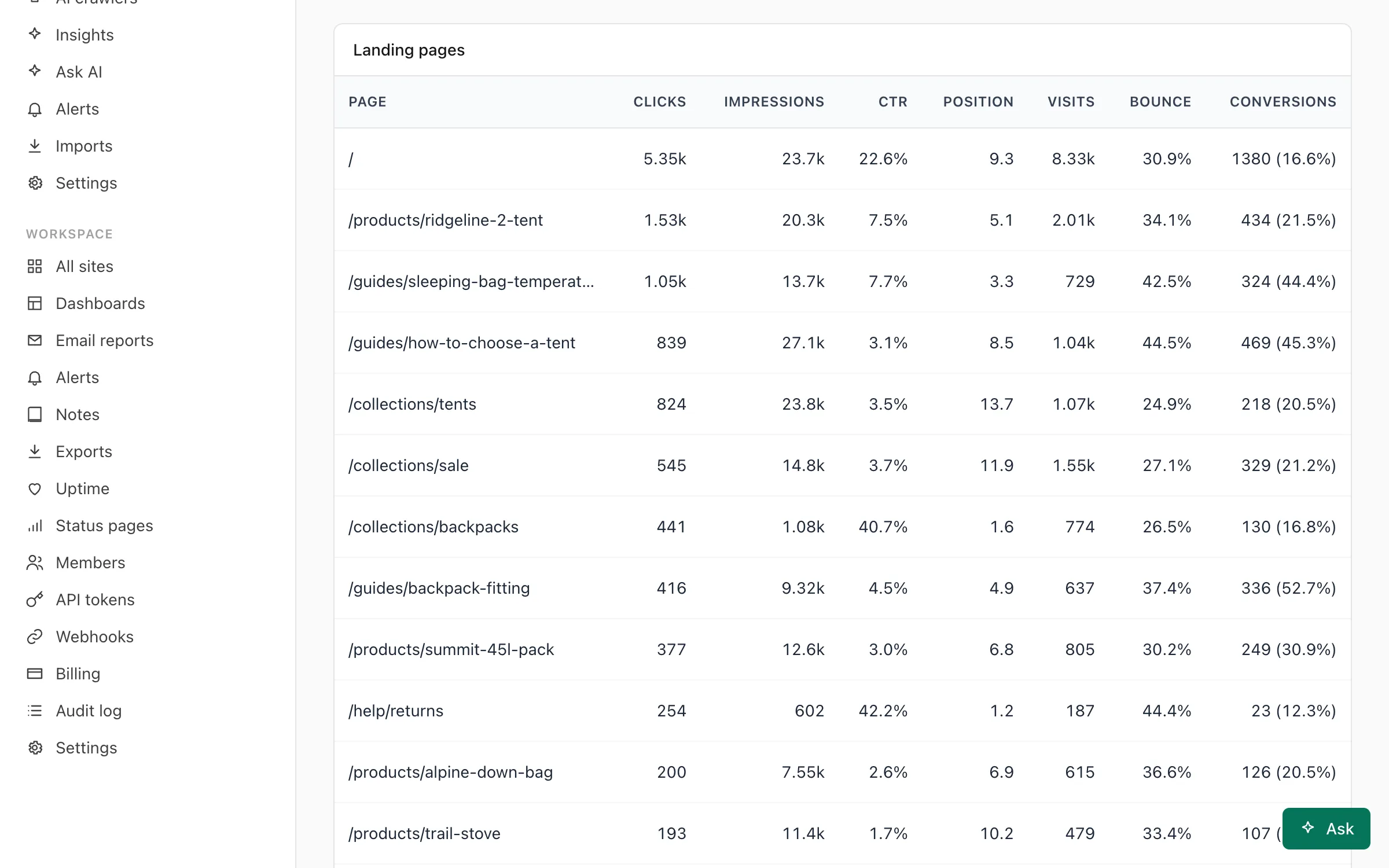
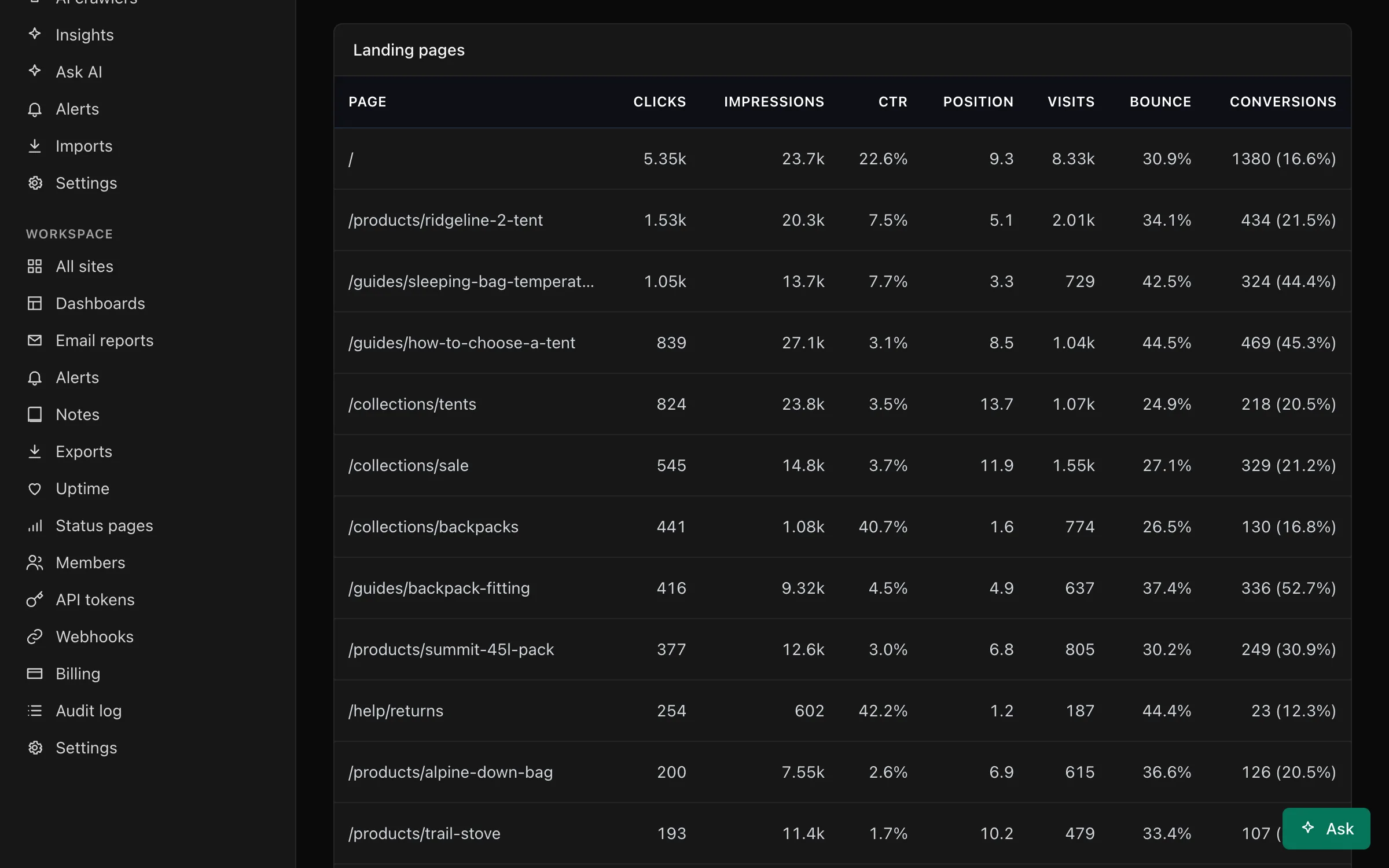
Switch between Google Search Console and Bing Webmaster Tools with the tabs. The dashboard's date range applies.
- Totals and Clicks by day: clicks, impressions, click-through rate and average position.
- Top queries, Countries and Devices, each with clicks, impressions, click-through rate and average position (the top 25 rows).
- Landing pages: each page's search clicks next to the Privatus Analytics visits that entered on that page in the same period (from any source), with their bounce rate and conversions. A visit converts when it completes any of the site's goals. This is an aggregate join by path. Nothing about individual people is involved.
- Opportunities: the ten queries with the most impressions that have at least 100 impressions and a click-through rate under 2%, and the ten pages with the most impressions at an average position of 8 to 20.
Bing reports queries and pages by week#
Bing gives daily numbers only for the whole site. The totals and the Clicks by day chart use those. Bing reports queries and pages once a week, and only the top ones, so those tables add up to less than the totals, and a short period can show fewer rows than you expect.
Why search numbers don't match visits#
Search clicks come from Google or Bing, visits from your site. They differ because of blockers, visitors who leave before the page loads, bots, and the search engines' own anonymised-query filtering.