Conversion goals
Set up conversion goals for page visits, custom events, engagement, outbound clicks and file downloads, with goal values, counting options and path matching.
A goal marks a visit as converted. Goals are definitions applied when you query, so creating or editing one updates all your history immediately.
Watch: Conversion funnels: see exactly where you lose customers (2:21)
Conversion funnels that show where you lose customers: set a goal, line up the steps, and the step where people give up stands out, with no cookies.
Transcript
Your traffic went up last month. Your sales didn't. Somewhere between your homepage and your checkout, people are leaving, and you can't see where.
I'm James, founder of Privatus Analytics. Let me show you exactly where you're losing them.
Every visitor who leaves before buying is someone you already paid to bring in. The ad, the blog post, the email that got them there. All of it spent, and then they're gone at the last step. Say a hundred people reach your product page and four buy. Where did the other ninety-six go? Cart? Checkout? The shipping page? Most analytics can't tell you. It shows you popular pages, not the path between them. So you guess. You redesign the checkout, because that's what everyone redesigns. Three weeks later, nothing's changed, because the leak was on the cart page all along. The tools that do show funnels usually follow each person with cookies, across days and devices. A lot of watching, just to find one broken step. And everyone who declined the banner is missing from the very funnel you're trying to fix.
With Privatus Analytics, you start by saying what success looks like. A purchase, a signup, a booked call. The moment you save it, your goal shows its full history. No waiting a month to see results. Add the value of each sale, and you see the money, not just the count. Now line up the steps your customers take. Product page, cart, checkout, thank you. Instantly, you see how many people make it through each step, and the step where they give up stands out. Click it, and see where those people went instead. Mobile? One campaign? One country? Break it down and find out. And you do all of this without following anyone. A funnel here is one visit, with no cookies, no profiles, and nobody tracked across days. Every visitor is in it, including the ones other tools miss.
No more guessing where your customers go. You know the one step that's costing you sales, and you fix that one. And you found it without watching a single person.
Find the leak in your funnel today. Start free at privatusanalytics.com.
Create one with Goals → New goal in the site menu. Every goal has a Name (up to 120 characters) and a Type.
Goal types#
| Type | Completes when | Settings |
|---|---|---|
| Page visit | A page matching the pattern is viewed | Match, pattern, optional hostname |
| Event | A custom event with that name fires | Event name, optional property conditions |
| Engagement | A page matching the pattern reaches a scroll depth or a time on page | Match, pattern, scroll depth, time on page |
| Outbound click | An Outbound Link event whose domain matches the pattern |
Match, pattern (a domain such as stripe.com) |
| File download | A File Download event whose file matches the pattern |
Match, pattern (a file name such as *.pdf) |
Outbound click and file download goals use the events of the
auto module, so turn that
module on first. The domain is the link's host without www., and the
file is the file name only, not its path. Engagement goals use the
engage module, which is on by default.
| Setting | Applies to | What it does |
|---|---|---|
| Match | Page visit, engagement, outbound click, file download | How the pattern is compared (see path matching) |
| Pattern | Page visit, engagement, outbound click, file download | Required. The path, domain or file name to match |
| Hostname | Page visit | Optional. Counts the page on that hostname only, for sites with several hostnames |
| Event name | Event | Required. The custom event's name. Renamed and merged events match under their display name |
| Property conditions | Event | Optional (see property conditions) |
| Scroll depth at least (%) | Engagement | The page was scrolled at least this far, from 0 to 100 |
| Time on page at least (seconds) | Engagement | The page was visible for at least this long |
An engagement goal needs at least one of the two thresholds. With both set, reaching either one completes the goal.
Path matching#
| Match | Example | Matches |
|---|---|---|
| Equals | /thank-you |
/thank-you only |
| Starts with | /docs/ |
Everything under /docs/ |
| Matches (* wildcard) | /blog/*/subscribed |
* stands for any characters |
| Regex | `^/(signup\ | register)/done$` |
Over the API the values are exact, prefix, glob and regex.
Property conditions#
Event goals can require properties. All conditions must match, and blank rows are ignored.
| Operator | Matches when the property |
|---|---|
is |
Equals the value exactly |
is_not |
Differs from the value, or is missing |
contains |
Contains the value, ignoring case |
gt |
Is a number greater than the value |
lt |
Is a number less than the value |
For example plan is pro and revenue gt 100. Property names use
lowercase letters, digits and underscores, up to 64 characters.
Value#
| Value | What the goal is worth |
|---|---|
| No value | Nothing. The value column shows a dash |
| Fixed value | The amount you enter, in the site currency, per conversion (or per completion with Every time) |
| Event revenue | The sum of the matching events' revenue, converted to the site currency |
Counting#
Two numbers are always reported: conversions are visits that completed the goal at least once, and completions are all the times it happened. The conversion rate is conversions divided by visits (or by visitors, if the site's conversion rate setting says so).
The Count setting only changes how a fixed value adds up:
- Once per visit (default): the fixed value counts once per converted visit.
- Every time: the fixed value counts for every completion.
The goal list and detail#
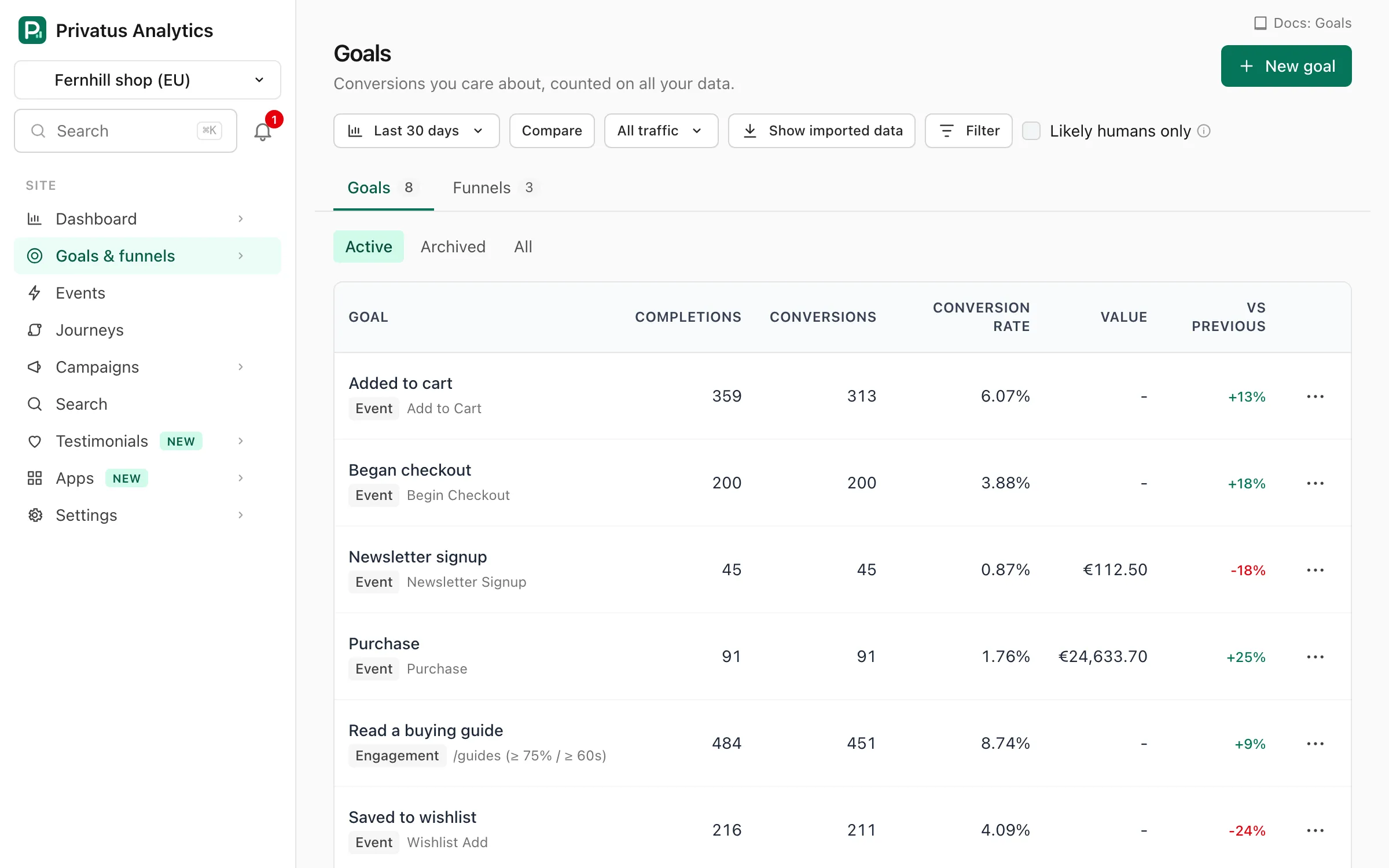
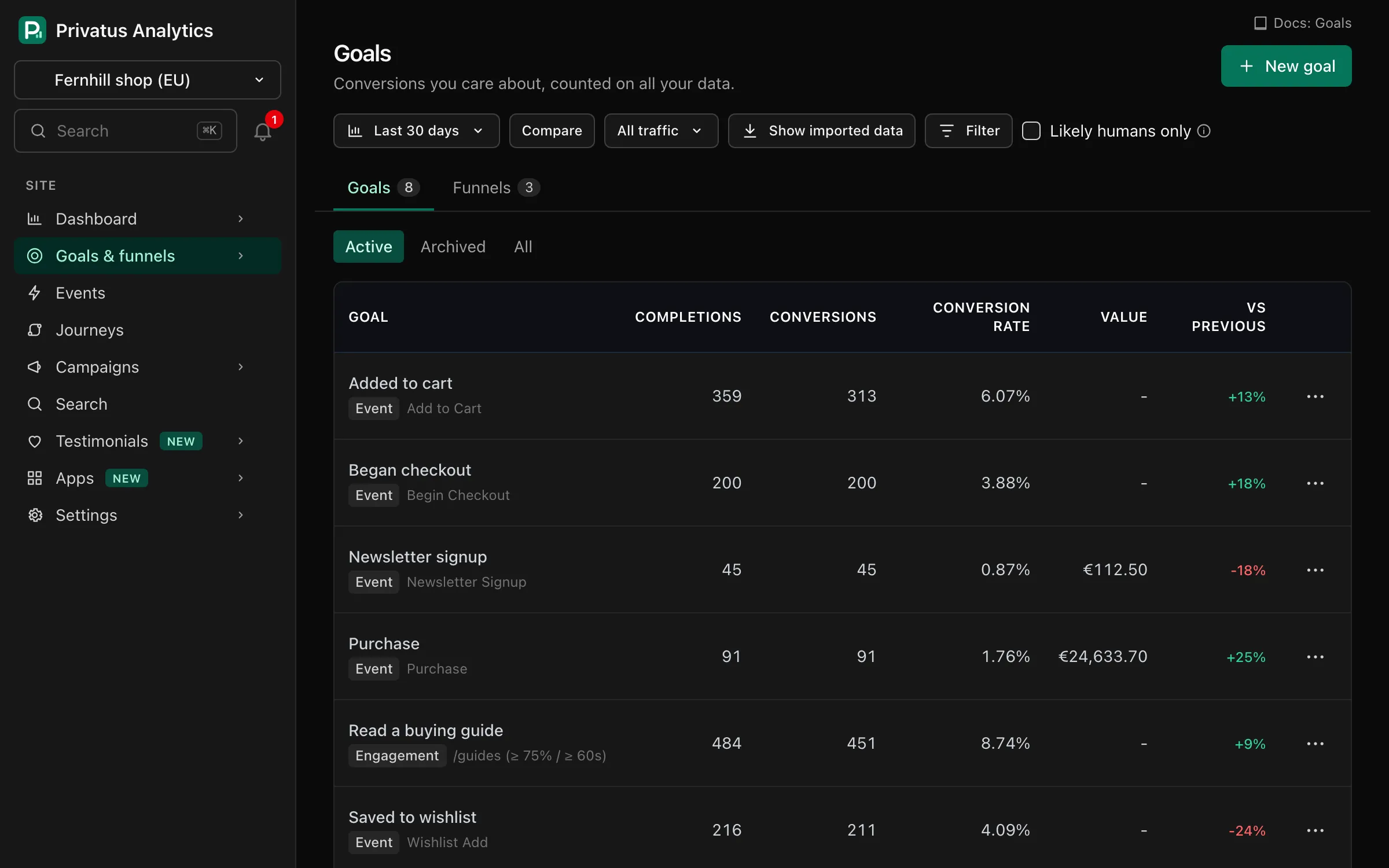
The list shows each goal's completions, conversions, conversion rate, value and the change in conversions against the previous period. Switch between Active, Archived and All goals. Each goal's menu has Edit, Duplicate, Archive (hides it without deleting, and Restore brings it back), Build funnel ending here, Create an alert and Delete. Deleting a goal removes it from reports and leaves your data untouched.
A goal's detail page charts conversions, completions or conversion rate over time, with breakdowns by channel, campaign, entry page, country and device (the top 10 values of each). Before converting shows the pages viewed earlier in the same visit, the median number of pages before the conversion and the median time to convert within the visit.
Limits#
Free: 10 active goals per site (archived goals don't count). Paid plans: unlimited.
API#
Goals are a REST resource under /sites/<site id>/goals and MCP tools
named goals_*: goals_list, goals_get, goals_create,
goals_update, goals_delete, goals_duplicate, goals_archive and
goals_unarchive. Viewing needs the analytics.read permission and
changes need content.write. The API reference lists every
input.