Analytics alerts and notifications
Alerts for traffic changes, anomalies, goals, downtime, SSL expiry, Web Vitals, MRR, churn and testimonials, by email, Slack, Teams or webhooks.
An alert is a rule that is checked every 5 minutes. When its condition becomes true the alert is Triggered and its channels are notified once. When the condition stops being true it goes back to OK and the channels get a "Back to normal" message.
Watch: Traffic alerts: know in minutes when signups drop (2:13)
Traffic alerts that tell you in minutes, not on Monday, when signups drop, a checkout breaks or your site goes down. One message, then an all clear.
Transcript
Your signups dropped to zero on Friday night. You found out on Monday. That's a whole weekend of sales, gone.
I'm James, founder of Privatus Analytics. Let me make sure that never happens to you.
Here's how a weekend like that happens. A deploy on Friday afternoon breaks the checkout button. Nothing crashes, nothing errors, the page just stops converting. Nobody watches a dashboard on a Saturday. So the first sign is a customer email on Monday, or worse, a quiet month-end. It isn't only breakages. A tracking script goes missing after a redesign and you lose two weeks of data. A post takes off and you find out after the moment has passed. You tried alerts before. They pinged you for every wobble, ten times a day, until you muted them. Then the real one came and you missed it. Or you bolted on a monitoring tool, with its own script on every page and its own bill, to watch a number your analytics already had. Every hour something goes unnoticed costs you money, and you've got no way to notice.
With Privatus Analytics, tell it what matters, and it keeps watch every five minutes. Traffic, signups, sales, a new site linking to you, or your site going down. Don't know what normal looks like? You don't have to. It compares today with the same time over the last four weeks and spots anything unusual, good or bad. You hear about it once, and again when things are back to normal. No flood of messages. It watches your site being up as well, and warns you before your certificate or your domain expires. No extra script, no extra tool. Alerts arrive by email, Slack, Teams, Discord, or a push to your browser. Or tell Claude or ChatGPT, over MCP: alert me if traffic drops. Done.
You hear about problems in minutes, not on Monday. A broken checkout gets fixed while there's still a weekend to save. And you only get the alerts that matter.
Set your first alert before the weekend. Start free at privatusanalytics.com.
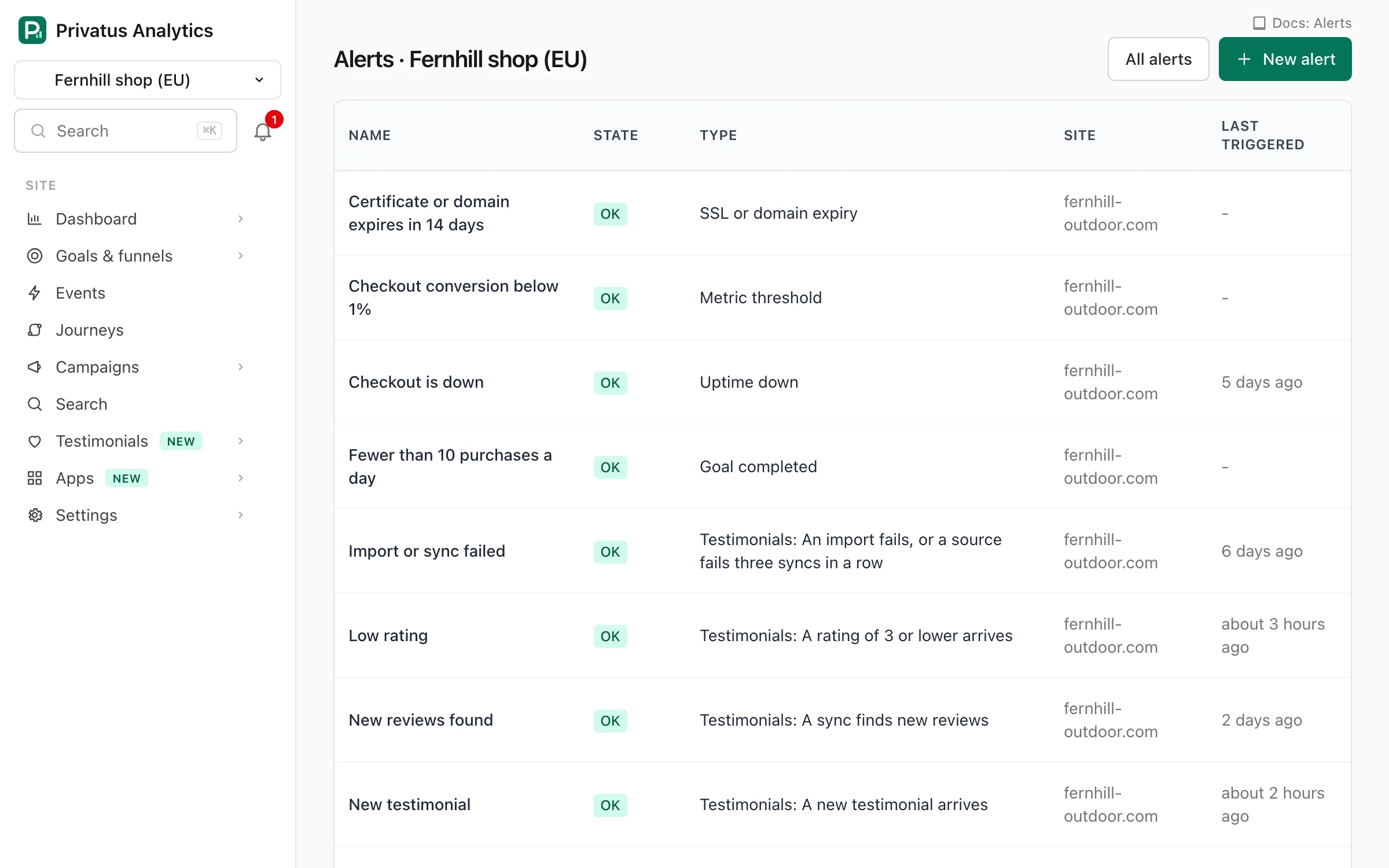
All alerts of a workspace are on its Alerts page (workspace menu), which
also has the Channels tab. A site's own alerts are listed under
Alerts in the site menu and in Site settings → Alerts. Creating and
editing alerts needs the content.write permission.
Rule types#
| Type | Triggers when | Threshold means |
|---|---|---|
| Metric threshold | A metric over the window is above, at least, below or at most a value. Metrics: visitors, visits, pageviews, bounce rate, conversion rate (needs a goal). With Compare with set to an earlier window, it triggers on a change instead (see below) | The value to compare with, or a percent change |
| Anomaly | Visitors, visits or pageviews in the window are far from the average of the same window in each of the previous 4 weeks | Not used. Set the sensitivity instead |
| Goal completed | The chosen goal is completed at least N times in the window | Completions (default 1) |
| New referrer | A site that sent no visit in the 30 days before the window sends at least N visitors in it. See below | Visitors from the new site (default 10) |
| No data (script missing) | The site has received no hits for N hours | Hours (default 24) |
| Usage of plan | This month's events reach N% of the workspace allowance. It has no site | Percent (default 80) |
| Uptime down | An enabled uptime check of the site is down. It resolves when all are up | Not used |
| SSL or domain expiry | A certificate or domain seen by the site's uptime checks expires within N days. The site needs at least one uptime check | Days (default 14) |
| Web Vitals regression | The 75th percentile of LCP, INP, CLS, FCP or TTFB over the window is past a limit. Needs at least 5 samples in the window | Milliseconds (a score for CLS) |
| Subscriptions (MRR and churn) | Over the last 30 days, as the Subscriptions page shows them: MRR fell by more than N%, or churn or MRR churn is above N%. You pick which under Tell me when. It waits while the site has no payment provider connected or nothing to measure | Percent (default 10) |
| Testimonials | Something happens in the Testimonials of the site. You pick what under Tell me when. See below | Not used |
Rule settings#
| Setting | What it does |
|---|---|
| Name | Shown in the list and in every notification. Up to 120 characters |
| Type | One of the rule types above |
| Site | The site the rule watches. Every type except usage needs one. A testimonials rule about the monthly allowance keeps none |
| Tell me when | Testimonials rules only. What the rule watches |
| Send notifications | Testimonials rules only. At once, each time it happens (the default), One summary an hour or One summary a day, at 9:00. See Summaries |
| Metric | The metric for threshold, anomaly and Web Vitals rules |
| Condition | is above, is at least, is below or is at most. For an anomaly, above or at least means only spikes, below or at most means only drops, and Either direction means both. A Web Vitals rule with no condition uses is above |
| Threshold | See the table above |
| Compare with | Threshold rules only. A fixed value (the default), The window before or The same window a week before |
| Minimum rating | New referrer rules only. From 0 to 100. Empty means any referrer |
| Count | Threshold, anomaly, goal and new referrer rules. All visits, or a shared segment of the rule's site |
| Window | How far back the rule looks: 15 or 30 minutes, 1, 3, 6 or 12 hours, 1 day or 7 days. Used by threshold, anomaly, goal, new referrer and Web Vitals rules. The API accepts any window_minutes from 5 to 10,080 |
| Sensitivity | Anomaly only. Low triggers on big changes only, High triggers more often, Medium is in between. A quiet window (under 5 for both the value and the average) never triggers |
| Goal | The goal for a goal rule or a conversion rate threshold |
| Uptime check | Optional check id (upc_…) for uptime and SSL rules. Leave it empty to watch all of the site's checks |
| Notify | The channels that get the notifications |
| Enabled | Untick to pause the rule. A paused rule isn't checked |
Alerts on part of your traffic#
A threshold, anomaly, goal or new referrer rule can count only some of a site's visits: one page, one source, one campaign, one country. Save the filters as a shared segment (Segments in the site menu), then pick it under Count in the alert form. Examples:
- Visitors to pages starting with
/blogdropped below 50 a day. - More than 20 views of your 404 page in an hour.
- An unusual spike from one campaign.
The rule follows the segment: edit the segment and the rule counts the new filters. Deleting the segment copies its filters onto the rule, so the rule keeps counting the same visits. A private segment can't be used, because a rule belongs to the whole workspace.
Through the API and MCP a rule also takes filters directly, in the
same format as the stats endpoints, together with
or without segment_id. Filters on traffic quality (interaction,
bot_score) need the Pro plan or above.
Alerts on a change#
Set Compare with on a threshold rule to compare the window with an earlier one. The threshold is then a percent change:
- is below 30 triggers when the metric dropped by more than 30%.
- is above 50 triggers when it rose by more than 50%.
The window before compares the last hour with the hour before it (or the last day with the day before). The same window a week before keeps the weekday and the time of day the same, which suits traffic with a weekly rhythm. A 7-day window compares this week with last week either way.
When the earlier window has nothing in it there is nothing to compare, and the rule keeps its state. Short windows on a quiet site swing a lot (2 visitors after 4 is a 50% drop), so pick a window that usually holds enough visits.
New referrers#
A new referrer rule tells you when a site starts sending you visitors: a mention in a newsletter, a forum thread, a post that is being shared.
- A referrer is new when its domain sent no visit in the 30 days
before the window. Subdomains count as their domain:
old.reddit.comis not new whenwww.reddit.comsent visits last week. - The threshold is how many visitors it has to send in the window.
- Minimum rating keeps the rule quiet for small sites. It is the Domain Rating of the referrer's domain, from 0 to 100. A domain seen for the first time is rated within a few minutes, and the alert waits for that.
- The notification names up to three new referrers, with the visitors each sent and its rating.
- With a segment under Count, only the visits in the segment count toward the threshold. Whether a referrer is new is always judged on the whole site.
The rule goes back to OK once no new referrer is left in the window.
Testimonials#
A testimonials rule is not checked every 5 minutes. It triggers at once, each time the thing it watches happens. One rule watches one thing on one site:
| Tell me when | Triggers when |
|---|---|
| A new testimonial arrives | Someone sends one through a form, a request or the API. Imports and testimonials you add by hand don't trigger it |
| A rating of 3 or lower arrives | A new testimonial has 1 to 3 stars, or a form routed a low rating to private feedback |
| A testimonial is approved | A testimonial of the site is approved |
| The monthly allowance is 80% used, used up, or holding a testimonial | The workspace reaches 80% or 100% of its monthly testimonials (once a month each), or a submission arrives over the allowance and is kept as waiting. This rule is about the whole workspace, so it has no site |
| A sync finds new reviews | An automatic sync of a source brought in at least one new review |
| An import fails, or a source fails three syncs in a row | An import you started ends in a failure, or a synced source is marked as errored |
| Someone asks for their testimonial to be removed | A person sends a removal request for a testimonial of the site |
| A request email bounces | A request email bounces or is marked as spam, once per person |
What is different from the other types:
- There is nothing to resolve. Each time is one line in the rule's history, already resolved, and the rule's state stays OK. Last triggered shows the latest one. No "Back to normal" message is sent.
- The notification says what happened in one sentence, with numbers and the names you gave your sources and requests. An email or chat channel also gets the person's name, the rating and the first 200 characters of a new, low rated or approved testimonial. No notification contains an email address.
- Open in a notification goes to the page where you act: the Inbox, the imports, the requests or the removal requests of the site.
- Bursts are held back. After 5 notifications of one rule within 10 minutes, one more says that the rest are held back, and the others in that window are only added to the history. The email limits below apply on top. A rule that sends summaries never needs this: it sends one message an hour at most.
- Mute, Acknowledge, pausing and the channels work as for every other rule.
Hourly and daily summaries#
A busy site can get many testimonials in a day. Under Send notifications a testimonials rule can report in summaries instead of one message each time:
| Send notifications | What happens |
|---|---|
| At once, each time it happens | The default. One notification each time |
| One summary an hour | Everything since the last summary goes out as one message at the top of the next hour. An hour in which nothing happened sends nothing |
| One summary a day, at 9:00 | One message a day at 9:00 in the workspace's time zone, with everything since the day before |
- The history is always current. Each time is added to the rule's history the moment it happens, whatever you choose. One that is still waiting for its summary is marked In the next summary.
- A summary is one message for each channel. It says how many there were and lists the first 10, each with its time and the same sentence the history shows, then "And 12 more".
- A summary holds less than a single notification. It lists numbers, ratings and the names you gave your sources and requests. It does not repeat a person's name or words: Open goes to the page of the site where you read them. No summary contains an email address.
- A muted rule sends no summary. What happened while it was muted is in its history.
- Workspace webhooks still get
alert.triggeredeach time, at once. - When you change a rule back to At once, what was already waiting still goes out at the time it was due.
The other rule types always notify at once, and the setting is not shown
for them: they report that something is wrong now (a site is down, traffic
dropped) and say when it is over, which a summary an hour later would
hide. Over the API and MCP, frequency is immediate, hourly or
daily on alerts_create and alerts_update, and it is ignored for
every type but testimonials.
When you first set a source to sync monthly or weekly, the site gets a rule named New reviews found by itself. It emails the workspace's first email channel, or a new channel with your own address when the workspace has none. Rename it, point it at other channels, mute it or delete it like any rule.
In the Testimonials of a site, Settings has a line that opens these rules and a New alert link with the type and the site already chosen.
Channels#
Alerts are delivered through notification channels, set up once per workspace under Alerts → Channels and reused by any rule:
| Channel | Plan | Settings |
|---|---|---|
| All | Up to 20 addresses | |
| Slack | Pro and up | Add to Slack and pick a channel (Slack app), or paste an incoming webhook URL on hooks.slack.com |
| Microsoft Teams | Pro and up | A Workflows webhook URL |
| Discord | Pro and up | A channel webhook URL |
| Webhook | Pro and up | Any public HTTPS URL that accepts JSON, and an optional signing secret. With a secret, requests carry X-Privatus-Signature: t=<unix time>,v1=<HMAC-SHA256 of "t.body"> |
| Browser push | Pro and up | No settings. Sends to every member who turned on browser notifications on the Channels page |
| PagerDuty | Business | The Events API v2 integration key of a service |
| Opsgenie | Business | An API key and the region (US or EU) |
The mobile app needs no channel. Every member who is signed in to the mobile app gets a push notification when an alert on a site they can open triggers or resolves, on every plan, unless the alert is muted or they switched alerts or that site off in the app. That is separate from the Browser push channel above, which is a channel on Pro and up for browsers. An Uptime down rule sends no app notification of its own, because the check itself already sends one.
A channel's type can't be changed after it is created. Each channel has a Send test button (up to 10 tests an hour per member, together with email report tests).
Every triggered or resolved alert is also sent to the workspace's
webhooks as alert.triggered and alert.resolved.
Goal and usage alerts add goal.completed_threshold and usage.threshold.
Email is limited so a flapping rule can't flood an inbox: one "triggered" email per alert and address every 30 minutes, 6 emails an hour per alert and address, and 200 alert emails an hour per workspace. The next email says how many were held back.
Unsubscribe#
Every alert email carries an Unsubscribe link and the one-click unsubscribe button of mail apps. Each email goes to one address, and the link stops the emails of that channel for that address only. Other addresses on the channel and other channels still get them. The address gets the emails again once it is removed from the channel and added back.
Uptime emails work the same way: the link stops the emails about that one check for the person who clicked it.
Noise control#
- Mute an alert for 1 hour, 1 day or 1 week (for example during a
planned migration). The API takes any number of
minutesup to 30 days, and0unmutes. A muted alert is still checked and still records history, and workspace webhooks still get its events. Only its channels stay silent. - History: every time the alert triggered, what happened, and when it resolved. Acknowledge marks the latest incident with your name to show the team someone's on it.