Bulk actions and undo
Approve, tag, collect, pin or trash many testimonials at once, over a selection or everything a filter matches, export them, and undo it for 7 days.
A bulk action does one thing to many testimonials at once: to the rows
you ticked, or to everything the current filter matches. The bar of
actions appears under the list of the Inbox
(Testimonials in the site's sidebar) as soon as a row is ticked. The
lists of testimonials on a collection, a person and a company have the
same bar. Bulk actions are on every plan and need content.write.
Selecting rows#
Tick the checkbox of a row in the List layout, or of a card in the Cards and Board layouts. The bar shows the number selected, a link that selects everything that matches, the actions and Clear. The checkbox in the header of the list ticks every row on the page.
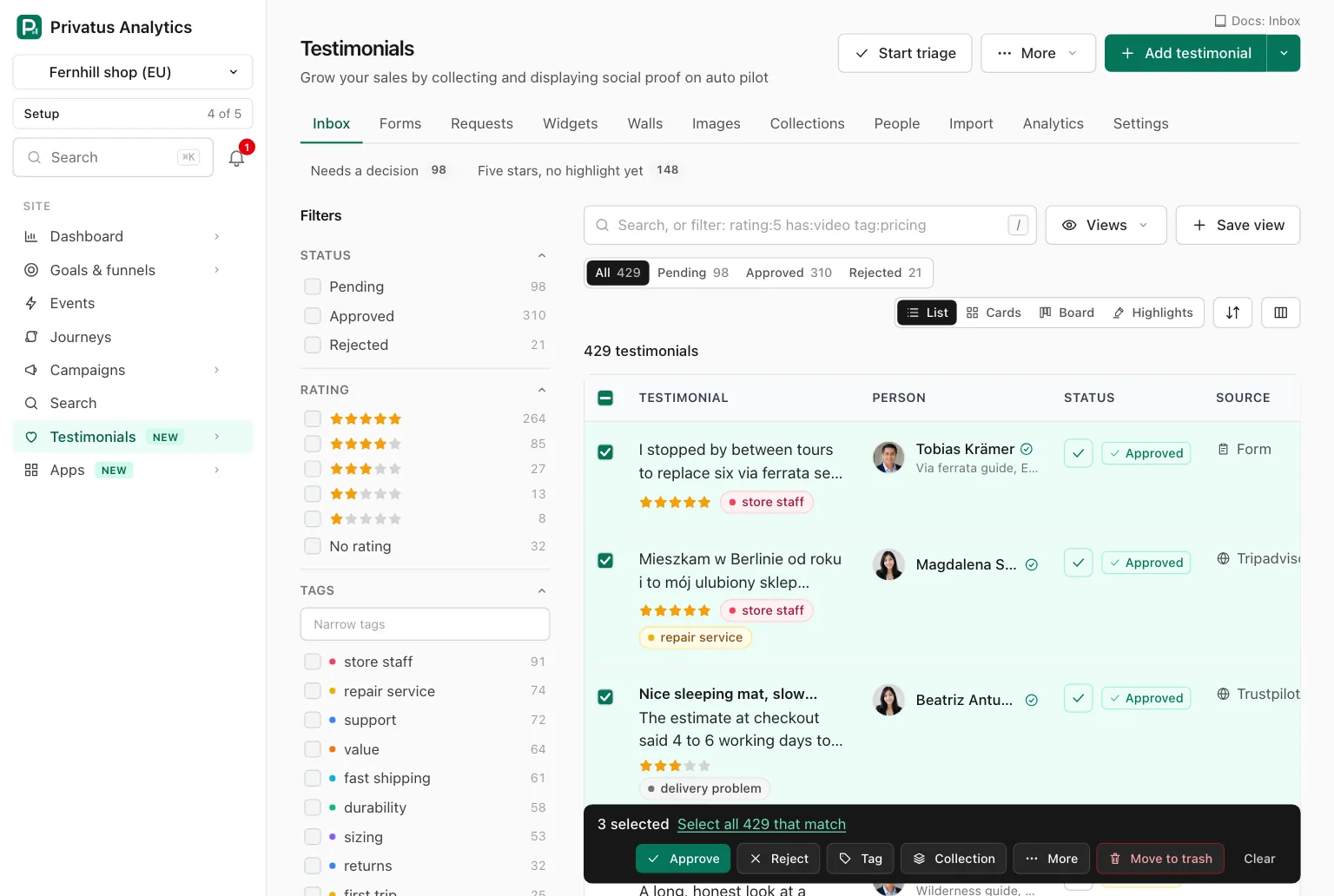
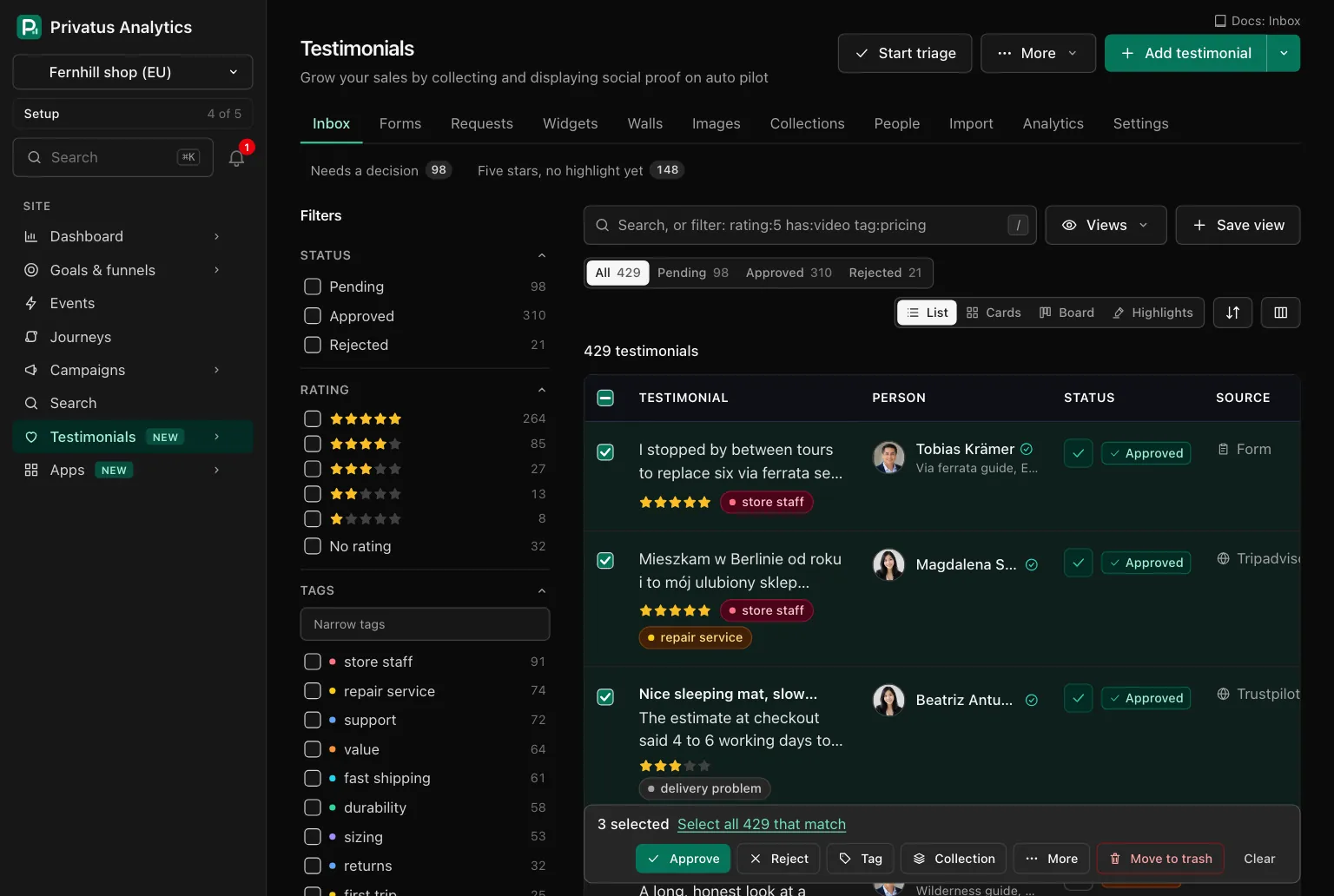
Up to 100 ticked testimonials run at once, all or none.
Selecting the whole result#
When every row on the page is ticked, a line says so and offers the rest: "All 25 on this page are selected. Select all 312 that match." The bar has the same Select all 312 that match link.
Choosing it selects everything the current filter matches, on every page. The bar then reads "All 312 that match", and a line above the list says "All 312 testimonials that match are selected." with the filter in words. Clear drops the selection and keeps the filter.
The actions#
The buttons are in this order in the bar. The action column is the
value the API takes.
| Button | action |
What it does | What undo does |
|---|---|---|---|
| Approve | approve |
Approves each one. Testimonials waiting for allowance are skipped | Returns each to the status it had |
| Reject | reject |
Rejects each one | Returns each to the status it had |
| Tag, then Add tag | add_tags |
Adds the tags you type in Tag names. Separate several with commas. A new name is created | Removes exactly the tags it added to each one |
| Tag, then Remove tag | remove_tags |
Removes the tags you name. A name the site does not have is refused | Returns exactly the tags it removed |
| Collection, then Add | add_to_collection |
Adds each one to the manual collection you choose | Takes them out again |
| Collection, then Remove | remove_from_collection |
Takes each one out of that collection | Puts them back in the place they had |
| Back to pending, under More | mark_pending |
Returns each to pending | Returns each to the status it had |
| Pin, Unpin, under More | pin, unpin |
Pins or unpins each one | Reverses it |
| Export as CSV, under More | Starts an export of the selection. See below | Nothing changed, so there is nothing to undo | |
| Turn on public pages, Turn off public pages, under More | permalink_on, permalink_off |
Switches the public page of each one. See Permalinks | Puts the switch back |
| Translate, under More | translate |
Translates each one into the languages the site offers and it does not hold yet. Business and above. See Languages and translation | Removes the translations it added. The characters are not returned |
| Make images, under More | make_images |
Draws a square quote card of each approved one. See Images | Deletes the images it made |
| Set a property, under More | set_property |
Sets one custom property to the value you type. An empty value clears it. Shown once the site has a property | Returns the earlier value of each one |
| Move to trash | trash |
Moves each one to the trash for 30 days | Restores them |
restore |
Restores each one from the trash. In the app this is on the Trash page | Moves them back to the trash | |
delete_permanently |
Deletes each one for good. API only, see below | Nothing. It cannot be undone |
A collection kept by rules cannot be chosen: nothing can be added to it or removed from it by hand. With no manual collection yet, the Collection menu says so and offers New collection.
The confirmation#
An action on ticked rows runs right away. An action on the whole result asks once before it runs, naming the action, the number and the filter in words, for example "Approve: all 312 testimonials that match? Testimonials where rating is any of 5."
If the number that matches has changed between the moment you selected and the moment you confirmed, nothing runs. The page comes back with the new number so you can look again.
The result#
After a run you are back on the list with a notice at the bottom of the
screen. It says how many changed, how many were skipped and why, for
example "12 approved. Skipped: 2 waiting for allowance and 1 already
there." The notice offers Undo for 10 seconds, and Z presses it.
| Skipped because | It means |
|---|---|
| Already there | It was already in the state the action sets: already approved, already tagged, already in the collection |
| Waiting for allowance | It cannot be approved until the monthly limit has room |
| In the trash | It is in the trash, so the action does not apply |
| Not in the trash | A restore was asked for something that is not in the trash |
| Not approved | Make images draws approved testimonials only |
| Words too long for the picture, letters the image font lacks | Make images could not draw it |
More than 100#
A whole result of more than 100 runs in the background, 100 at a time. The notice says "Working on 312 in the background", and a strip above the list shows how far the run is ("180 of 312 done") and keeps itself up to date. When it is done the strip offers Show the result and Open the undo list. You can leave the page while it works. The strip shows your own runs.
An undo of a run that changed more than 100 also works in the background.
Export#
Export as CSV is in the More menu for members who hold
analytics.export. It starts an export of the ticked rows, or of the
whole result, and takes you to the page of that export, where the file
can be downloaded once it is built. You get an email when it is ready.
The file is listed under Data exports and kept
for 7 days.
Nothing in the trash is exported. The file has the person's email column
only when you hold content.write.
The undo list#
Every change made from a list leaves an undo record, whether it touched
one testimonial or ten thousand. The undo list is the Undo list
sub-tab of Settings in Testimonials, at
/sites/<site id>/testimonials/settings/undo, newest first.
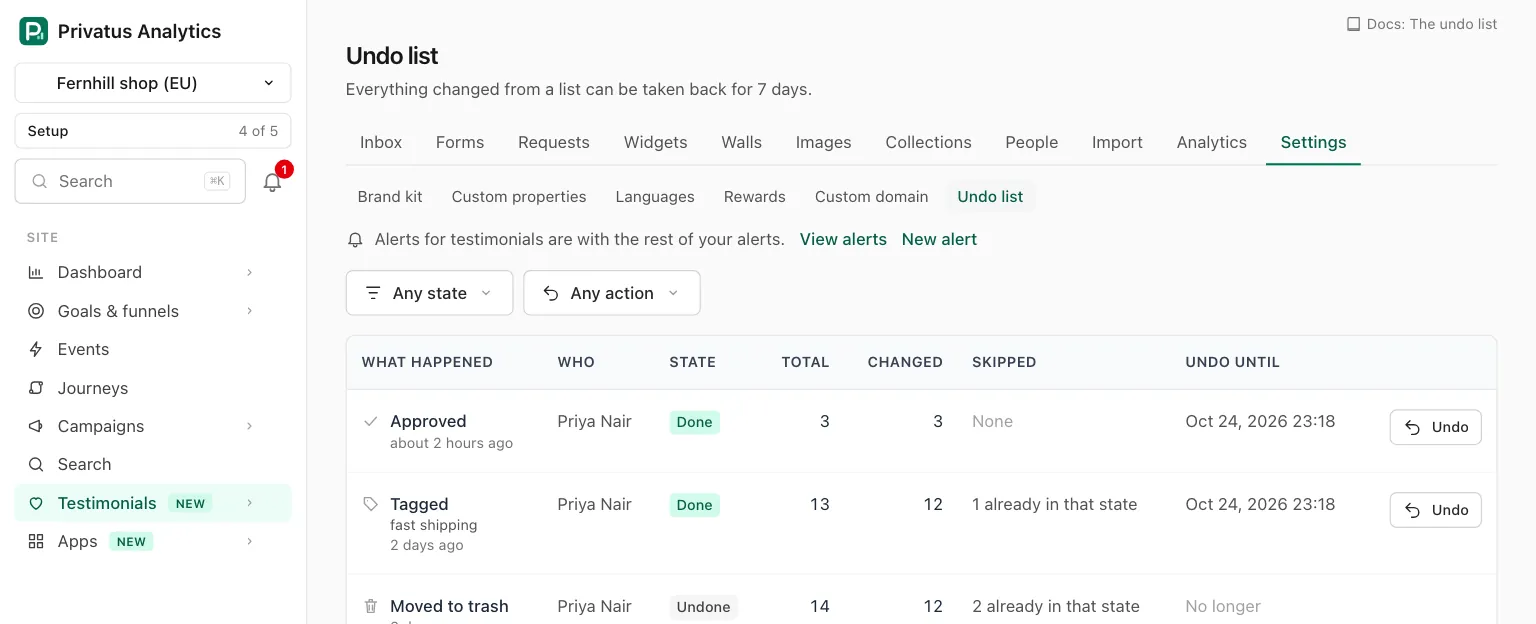
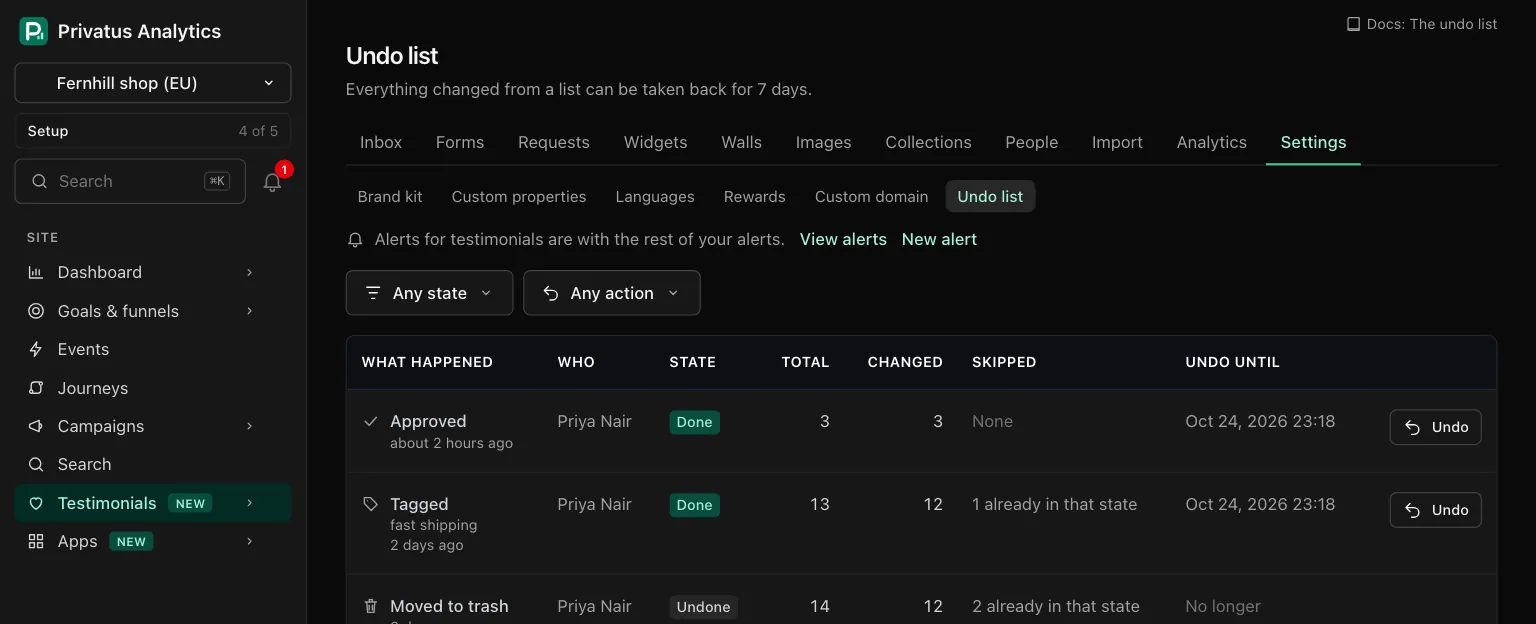
Two menus filter the list: one by state and one by action.
| Column | What it means |
|---|---|
| What happened | The action in words (Approved, Tagged, Moved to trash, Merged duplicates, Merged people), with the tags, the collection or the property it used, and how long ago. It opens the page of that record |
| Who | The member who ran it |
| State | Running, Done, Stopped, Undone or Expired. A run in the background shows how far it is ("180 of 312 done") and the page keeps itself up to date |
| Total | How many testimonials the selection held |
| Changed | How many it changed |
| Skipped | How many it left as they were, with the reason |
| Undo until | The last moment it can be undone, 7 days after it finished. "No longer" after that |
Undo, on the row and on the page of the record, is shown to members
who hold content.write. It puts the earlier value back on everything
the run changed. A testimonial that was changed again since is left alone
and counted, and so is one that was deleted for good. Each record can be
undone once. More than 100 testimonials go back in the background.
The page of one record adds when it started and finished, whether the selection was Ticked rows or Everything a filter matched, and after an undo how many were Put back and how many were Left alone.
API and MCP#
| Action | MCP tool | Permission |
|---|---|---|
| Run one action over a selection or a whole result | None: the bulk route is JSON API only (POST /sites/{site_id}/testimonials/bulk.json). Over MCP, each action has its own tool |
content.write |
| Undo a run | testimonials_bulk_undo |
content.write |
| List the undo records | testimonial_undo_records_list |
analytics.read |
| Read one undo record | testimonial_undo_records_get |
analytics.read |
| Undo from the undo list | testimonial_undo_records_undo |
content.write |
The inputs and the response fields are in the API reference and the MCP reference. What is worth knowing beside them:
- Send
ids(up to 100 testimonial ids) orfilters(the inputs oftestimonials_list), never both. filtersneedsconfirm_count, on a dry run too: the number of testimonials you expect it to touch, which ismeta.totaloftestimonials_facetsfor the same filter. If the number has changed, nothing runs and the error iscount_changed.dry_runresponds with what would change and what would be skipped, and changes nothing. A dry run overfiltersthat match more than 1,000 testimonials is refused withrehearsal_too_large: narrow the filter, or run it for real.- The response of a run of more than 100 has the state
running. delete_permanentlyneedssites.manage, a selection of 100 or fewer and the name of the site inconfirm. See Trash.- An AI assistant cannot delete anything or move anything to the trash, and has no bulk tool: one tool that runs several actions picked by an input is what the Claude and ChatGPT directories refuse. It approves, rejects, pins, tags, translates or makes images with the tool of each action.
- Over MCP an undo is refused the same way when taking the run back
would delete something or move it to the trash: the undo of a
restore, atranslateor amake_imagesrun. The response has the address of the undo record, where a person presses Undo. - Over HTTP,
action: "export"with the same selection and an optionalformat(csv,json,ndjsonorxlsx) starts the export, needsanalytics.exportand responds with 202 and the export. The MCP tool does not listexportamong its actions.
A call that is refused responds with 422 and one of these in
error.code.
| Code | Meaning |
|---|---|
selection |
Send ids or filters, not both and not neither |
too_many |
More than 100 ids, or more than 100 to delete permanently |
unknown_ids |
One of the ids is not a testimonial of this site. Nothing runs |
rehearsal_too_large |
A dry_run over more than 1,000 testimonials. error.count is the most a dry run covers. Narrow the filter, or run it for real |
count_changed |
The number that matches is not confirm_count. error.count has the number now. Nothing runs |
not_allowed |
Deleting permanently needs sites.manage |
not_undoable |
The run is still working, was already undone, stopped before it finished, or is older than 7 days. Also the response for an action that cannot be taken back, such as an export |
validation_failed |
Anything else that does not fit, with a sentence that says what: an empty selection, a missing confirm_count, a filter input the list does not take, no tag named, a tag to remove that the site does not have, an unknown collection, a collection kept by rules, a missing property, or a confirm that is not the name of the site |
translate on a plan without translation responds with 402 and
plan_limit.
Ask your assistant:
- "Tag every testimonial that mentions onboarding."
- "Approve these three."
- "That was a mistake, take it back."
- "What did we change in the testimonials this week?"
Good to know#
- An undo never overwrites newer work. A testimonial changed again after the run is left as it is and counted as "changed again since".
- One testimonial approved, rejected, pinned, tagged or trashed from its row or its page leaves an undo record too. A change that changed nothing, such as approving one that is already approved, leaves none.
- Delete permanently and Empty trash never leave an undo record. An export changes nothing, so there is nothing to take back.
- After 7 days a record stays in the list as Expired and can no longer be undone.
- A run that stopped before it finished shows Stopped and cannot be undone from the list. What it changed is counted on its page.
- The Highlights layout has no checkboxes. Switch to List, Cards or Board to select.
- Translate is offered on Business and above. On other plans the button is not in the menu.