Share and embed a form
The four ways to put a testimonial form in front of customers: a link, a QR code, an inline embed on your page and a popup embed opened by a button.
The Share page gives you the four ways to put a form in front of customers: a link, a QR code, an inline embed and a popup embed. Open Testimonials in the site's sidebar, then Forms, then Share in the menu of a form. The Share tab of the builder shows the same four cards without their options.
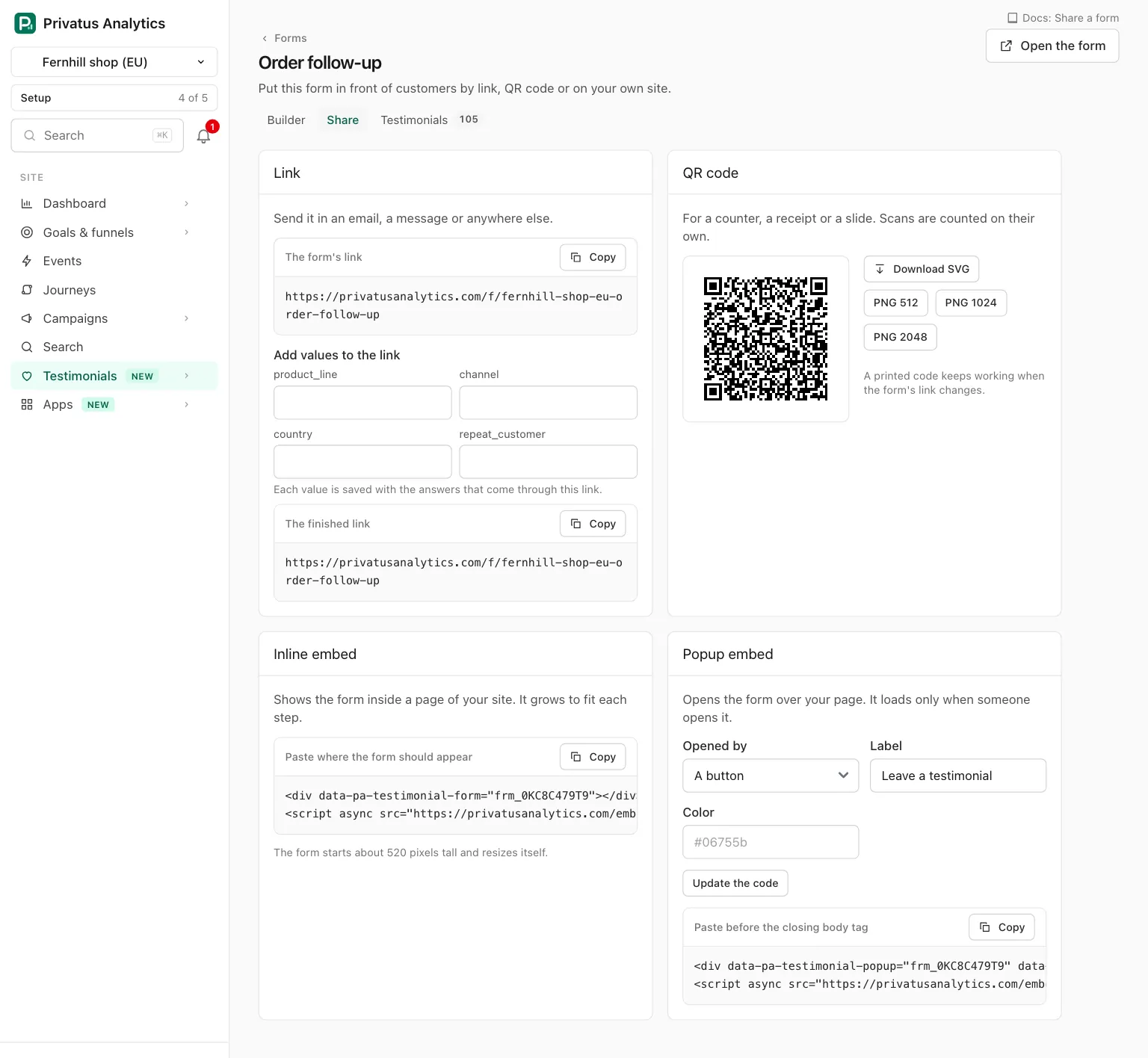
Any member who can read the site can open the Share page. Open the form in the header opens the form in a new tab.
Link#
The link is https://privatus.page/f/<slug>, with a Copy button.
Send it in an email, a message or anywhere else.
If the site has custom properties, or the form has URL parameters, Add values to the link shows one field for each parameter. Type a value and The finished link below is built for you to copy. Each value is saved with the answers that come through that link.
When you change a form's link, the old one keeps working.
QR code#
| Control | What it does |
|---|---|
| Download SVG | The code as an SVG file |
| PNG 512, PNG 1024, PNG 2048 | The code as a PNG of that many pixels |
| Black, Brand color | Shown when the form's accent color, or the brand kit's, is dark enough to scan: a contrast of at least 7 to 1 on white. Otherwise the code is black |
The code is drawn by Privatus Analytics itself: no outside service sees
the link. It holds the link with ?src=qr, so scans are counted on
their own. A printed code keeps working when the form's link changes.
Inline embed#
Shows the form inside a page of your site. Paste the code where the form should appear:
<div data-pa-testimonial-form="frm_..."></div>
<script async src="https://privatus.page/embed/form.js"></script>
The form sits in a frame that starts about 520 pixels tall and resizes itself to fit each step. The code names the form by its id, so it keeps working when the form's link changes.
Popup embed#
Opens the form over your page. Choose the options, press Update the
code, and paste the code before the closing body tag.
| Option | What it does |
|---|---|
| Opened by | A button, A tab on the side or An element of your own |
| Label | The text of the button or tab, up to 40 characters. The default is "Leave a testimonial" in the form's language |
| Side | For a tab: Left or Right |
| Color | The color of the button or tab, as a hex color such as #06755b |
| Opened by | Code |
|---|---|
| A button | <div data-pa-testimonial-popup="frm_..." data-trigger="button" data-label="Leave a testimonial"></div> |
| A tab on the side | The same, with data-trigger="tab" and data-position="left" or "right" |
| An element of your own | <button type="button" data-pa-testimonial-open="frm_...">Leave a testimonial</button>. The attribute works on any element of your page |
Each is followed by the same script line as the inline embed.
data-accent sets the color of the button or tab.
The form loads only when someone opens the popup. Escape and the close button close it, and closing with answers typed asks first. On a screen up to 640 pixels wide it fills the screen.
What happens next#
An answer that comes in through any of these becomes a testimonial in the Inbox. The Forms tab counts views, starts and submissions for each form, and each is also counted by channel: link, QR code, inline embed and popup.
API and MCP#
| Action | MCP tool | Permission |
|---|---|---|
| The link and the embed code | testimonial_forms_share |
analytics.read |
| The QR code | testimonial_forms_qr |
analytics.read |
The inputs and the response fields are in the API reference and the MCP reference. A QR color that is too light to scan is refused.
Good to know#
- The script.
form.jsis one small file (under 10 KB) served by Privatus Analytics. It sets no cookie, keeps nothing in the browser and loads nothing from another company. - URL parameters on your page. When your page's address has a
parameter (for example
?product=pro), the script hands it to the form, which keeps only the parameters the form maps and the ones the site's custom properties declare. Nothing else about your page or your visitor is read. - Recording inside an embed. The frame is allowed to use the camera and the microphone. If they cannot be used there, the form offers Open the form in a new tab. Video and audio answers are offered on Pro and up.
- How fast a change shows. The form's page is kept at Cloudflare so
it opens fast everywhere. Saving the form, the brand kit or the
site's name, moving the form to the trash or restoring it, and a
change of plan each clear the kept copies. A link with other
parameters (such as
?product=pro) is never kept and always shows the latest form.