AI crawler tracking from server logs
See which AI crawlers like GPTBot, ClaudeBot and PerplexityBot, and which search bots, read your pages, from server or CDN logs with no IP addresses stored.
Crawlers don't run JavaScript, so the tracker never sees them. The AI crawlers report is built from your Cloudflare analytics or your server or CDN logs instead.
Watch: Is ChatGPT sending you visitors? AI traffic and AI crawlers (2:11)
Is ChatGPT sending you visitors? See the people AI assistants send you as their own channel, and the AI crawlers reading pages your analytics never saw.
Transcript
More and more people ask ChatGPT instead of searching. Is it sending them to you? And how often are AI bots reading your pages? Most analytics tools can't tell you.
I'm James, founder of Privatus Analytics. Let me show you both.
Something changed in the last year, and your analytics hasn't noticed. People are asking an AI assistant instead of Google, and when it recommends you, that visitor shows up in your reports as just another referral, lumped in with everything else. So you can't tell whether AI is becoming a real source of customers, or whether it's recommending your competitor instead. Then there's the other side. AI crawlers are reading your site, page by page, to train on it and to quote it. Some of them respect your rules. Some don't. They never run tracking code, so your analytics has never seen one. You don't know which pages they take, how often, or who they are. It's the one case where your site is the one being watched, and you have no idea by whom. So you make decisions about content and about blocking with no numbers at all.
In Privatus Analytics, AI assistants get their own channel. Visitors from ChatGPT, Perplexity, Claude, Gemini and Copilot, in one place. Watch it grow, see which pages they land on, and set a goal to find out whether they buy. Now the crawlers. Connect Cloudflare with a read-only key, or upload your server logs, and see every AI crawler that visits, how often, and which pages it reads. GPTBot, ClaudeBot, PerplexityBot and the rest. Now you can decide what to allow, and spot the ones ignoring your rules. All of it counted without a cookie, so every AI visitor is in the numbers. Or ask Claude or ChatGPT, over MCP, which AI tools sent you visitors this month.
AI traffic is no longer a mystery. You see the customers AI sends you, and what its crawlers take. And you make your choices with real numbers.
Find out what AI is sending you. Start free at privatusanalytics.com.
What you see#
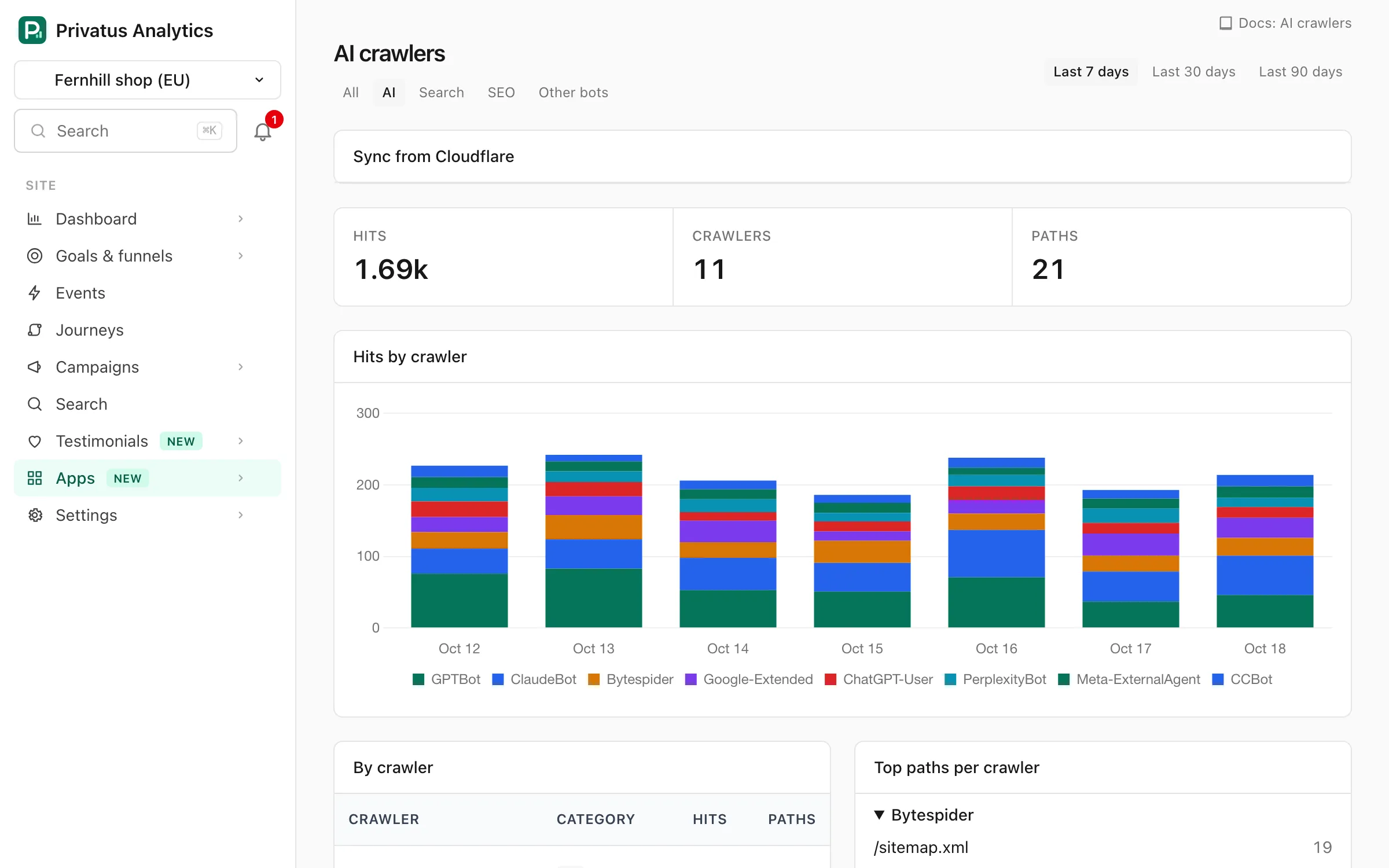
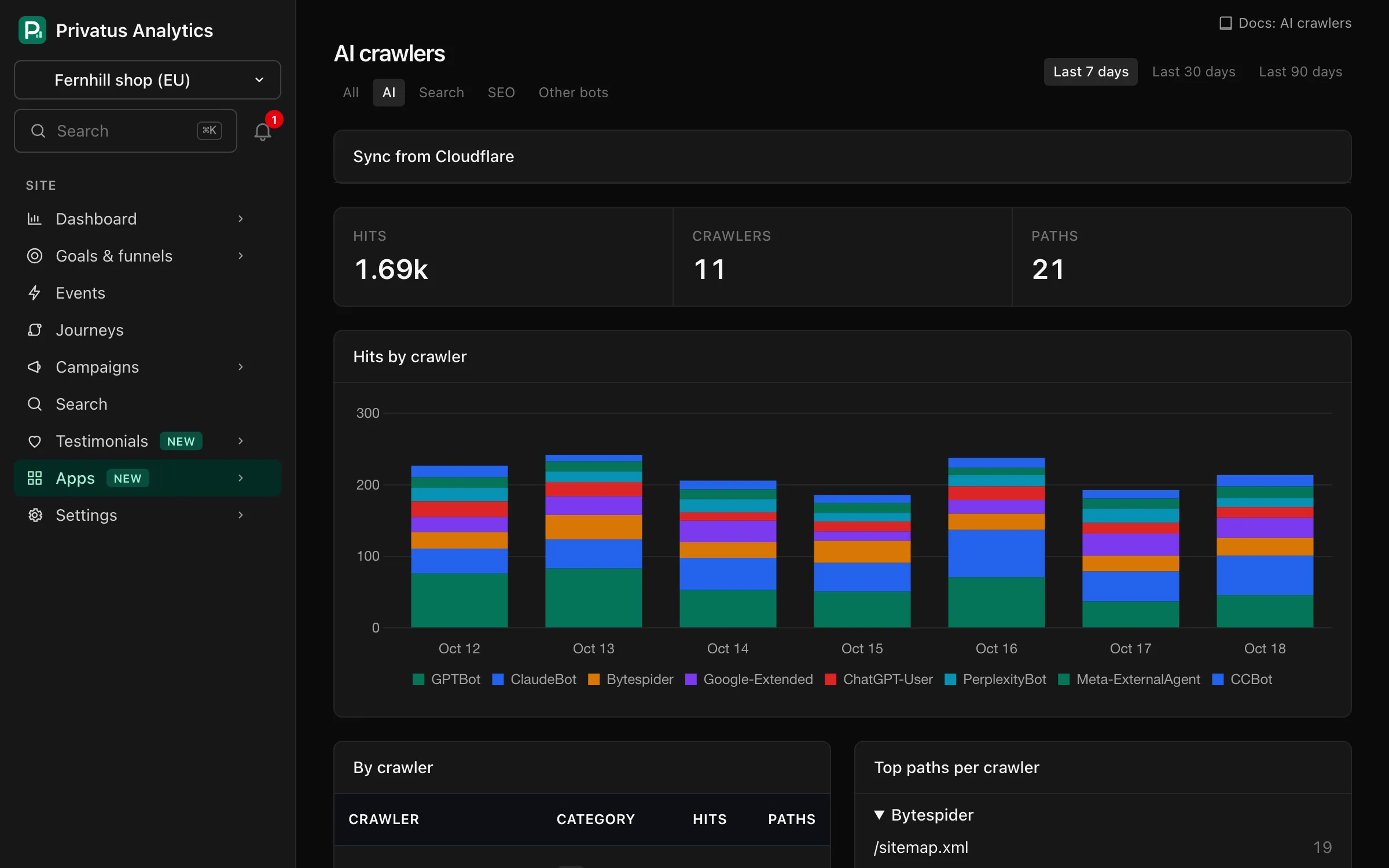
Daily hits per crawler and per path. The tabs filter by category (the report opens on AI, and All shows every category):
| Category | Examples |
|---|---|
| AI (training, AI search and assistants) | GPTBot, ChatGPT-User, OAI-SearchBot, ClaudeBot, Claude-User, PerplexityBot, Google-Extended, Applebot-Extended, Bytespider, CCBot, Amazonbot, Meta-ExternalAgent |
| Search | Googlebot, Bingbot, DuckDuckBot, YandexBot, Baiduspider, Applebot |
| SEO | AhrefsBot, SemrushBot, MJ12bot and similar |
| Other bots | Any other bot, script or HTTP client |
The report shows total hits, crawlers and paths, a Hits by crawler chart for the eight busiest crawlers, a By crawler table (click a crawler to see only its hits) and the ten Top paths per crawler. The period defaults to the last 7 days.
Use it to decide what to allow in robots.txt, to see which pages AI
assistants fetch when answering users, and to spot crawlers ignoring your
rules.
AI assistants sending people to your site is different: those visits appear in the AI assistants channel.
Connect Cloudflare#
If your site is behind Cloudflare, this is the quickest way. There is nothing to deploy. You give us a read-only Cloudflare API token and we read the crawler counts from Cloudflare's analytics.
Create the API token#
- In Cloudflare, open My Profile → API Tokens → Create Token → Create Custom Token. The link on the site's AI crawlers page opens this form with the permissions already selected.
- Give it a name, for example "Privatus Analytics".
- Under Permissions, add exactly these two rows:
| First box | Second box | Third box | |---|---|---| | Zone | Zone | Read | | Zone | Analytics | Read |
- Under Zone Resources, choose Include → Specific zone and pick the site's zone. All zones also works if you plan to connect several sites with one token.
- Leave Client IP Address Filtering empty, and leave TTL empty unless you want the token to expire.
- Select Continue to summary, then Create Token, and copy the token. Cloudflare shows it once.
Both permissions are read-only. The token can list your zones and read their analytics. It cannot change DNS, settings or anything else in your Cloudflare account. Do not add Edit permissions.
Connect#
- Open the site's AI crawlers page, paste the token under Sync from Cloudflare and choose Load my zones.
- Pick the zone that serves the site and choose Connect Cloudflare.
We check the token before saving it. If it lacks a permission, the page says which one.
The first import brings in up to 30 days, as far back as your Cloudflare
plan keeps analytics. After that the report updates every three hours, and
Sync now imports straight away. Only requests to the site's own
hostname (with and without www) are counted, so other subdomains in the
same zone stay out.
Good to know:
- Cloudflare samples analytics on busy zones, so hit counts are close estimates, not exact log counts.
- Each day keeps the 10,000 busiest crawler and path pairs.
- Use Cloudflare sync or log shipping for a site, not both, or the same hits are counted twice.
- The token is stored encrypted and never shown again, in the app or over the API.
- Disconnect removes the token from Privatus Analytics and the hits imported from Cloudflare. Hits from your own logs stay. Delete the token in Cloudflare too (My Profile → API Tokens) if you no longer need it.
- If you delete or roll the token in Cloudflare, the page shows Sync failing and asks for a new one.
Connecting takes your Cloudflare token, so it is in the app only, never
over the API or MCP. Once connected, crawlers_cloudflare_sync and
crawlers_cloudflare_disconnect manage the connection. Over MCP crawlers_cloudflare_disconnect only returns a link
to this page, see Actions for a person.
Connect your logs#
Not on Cloudflare, or want exact counts? Send logs yourself.
Post log lines to https://privatusanalytics.com/api/logs with the site's
crawler log key (Site settings →
Tracking → Crawler log key) as a Bearer token. A request holds up to 1,000 lines and 1 MB, in one of two
formats:
| Format | Content-Type | Body |
|---|---|---|
| JSON | application/json |
{"lines": [{"ts", "path", "status", "user_agent"}]} |
| Raw log text | text/plain |
Lines in the "combined" log format (Nginx, Apache) |
Send server logs on the site's AI crawlers page has a starting point for each setup:
- Nginx: a
curlcommand that ships the access log, to run from cron. - Cloudflare Worker: a Worker that forwards each request as a JSON line.
- Vercel and Netlify: a log drain. Their entries have to be mapped to the JSON format above, in a small relay if needed.
Privacy#
Log lines contain visitors' IP addresses, so we parse them immediately and keep only daily hit counts per crawler name and path. Query strings are removed, and paths are masked and scrubbed like pageview paths. Lines from normal browsers are skipped. The IP, the referrer, the status code and any user field are discarded as soon as a line is split and are never stored.
The Cloudflare sync never receives IP addresses at all. Cloudflare sends us request counts grouped by User-Agent and path. We use the User-Agent to name the crawler and store only the name, the path and the daily count.