Move from another tool
Bring everything across from Senja or Testimonial.to with your own API key from that tool. The key is used for one reading and then wiped.
Move from another tool brings your testimonials across from Senja or Testimonial.to, so you can stop paying for the other tool. Open Testimonials in the site's sidebar, then the Import tab, then Move from another tool under Other ways in.
A move is never limited by your plan. Nothing you move counts toward your
monthly testimonials, on any plan, and a move
is not the Free plan's
fetched import.
Starting one needs the content.write permission.
Note: Both moves are built from each tool's own published documentation. They have not yet been run against a live account, so check the review step before you keep. If something does not come across as it should, write to [email protected].
1. Choose the tool#
The page has a card for each tool, with what comes across and what does not, and a button: Move from Senja or Move from Testimonial.to.
| Senja | Testimonial.to | |
|---|---|---|
| The words, the rating and the date | Yes | Yes |
| A title | Yes | No |
| The person's name, job title, photo, email address and social link | Yes | Yes |
| The person's company | Yes | No |
| Tags | Yes | Yes |
| Whether it was approved | Yes | What is liked there counts as approved |
| Videos | Yes | Yes |
| The language and the testimonial's own link | Yes | No |
| Where it came from there | Yes, as the source name | No |
Forms, widgets, walls and analytics do not come across from either tool. You set those up here.
Testimonial.to offers an API key only on its top plans. Without one, export your testimonials there as a spreadsheet and use Import a spreadsheet. The card links to it.
2. Paste your key#
| Control | What it does |
|---|---|
| Your Senja API key or Your Testimonial.to API key | Your own key from the other tool. The field hides what you type |
| Back | Returns to the two cards |
| Read my account | Stores the key and starts reading |
| Tool | Where the key is |
|---|---|
| Senja | Settings, Integrate, the API tab. One key per project |
| Testimonial.to | The menu on your project card there, API Key. One key per project |
What happens to the key:
- It is stored encrypted.
- It is used only for this import.
- It is wiped as soon as the import has read everything, whether that worked or not.
No page and no API response shows it again.
3. The reading#
The whole account is read in one pass, up to 20,000 testimonials. The page says Reading and refreshes itself. A site reads one move at a time.
If the other tool does not accept the key, the page says "The move could not be read", gives the reason and says the key has been wiped. Start again takes you back to paste it once more.
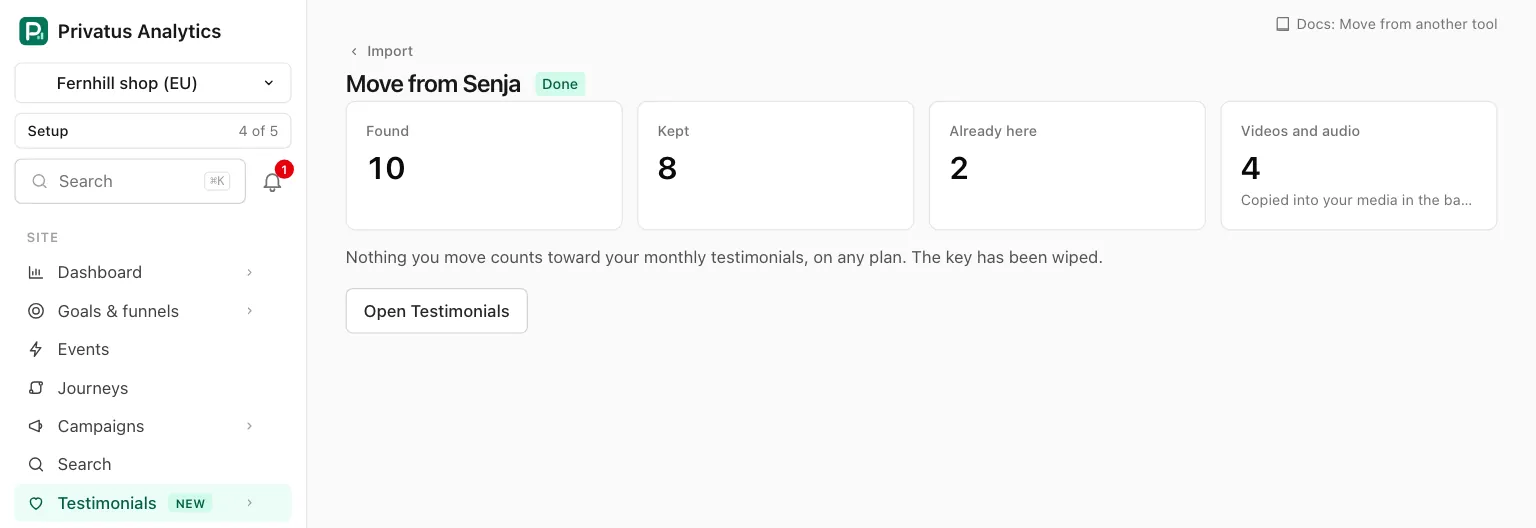
When the reading is done, the page of the move shows four numbers.
| Number | Meaning |
|---|---|
| Found | Testimonials read from the account |
| Kept | The ones you have kept so far |
| Already here | The ones that match a testimonial the site already holds, exactly or closely |
| Videos and audio | Recordings of what you kept, copied into your media in the background |
Under them is Review with the number that waits, or Open Testimonials once nothing waits.
4. Review and keep#
Review opens the review step, the same one every import uses, with one more switch.
| Control | What it does |
|---|---|
| Keep approval as it was there | Ticked to begin with. What was approved in the other tool arrives Approved and everything else Pending, whatever Add as says. Untick it to give everything the Add as status |
A video that came with no written words is listed as "A video, with no written words".
After you keep:
- Videos and photos are copied into your media in the background. A photo is copied only for a person who has none yet.
- A video of up to 10 minutes comes across, whatever your plan's recording length, on the Free plan too.
- A moved testimonial keeps its original date. It does not carry the verified mark.
- The move is Done once nothing with a tick box is left.
API and MCP#
| Action | MCP tool | Permission |
|---|---|---|
| List the moves of a site | testimonial_migrations_list |
analytics.read |
| Read one move | testimonial_migrations_get |
analytics.read |
| List what waits in its review step | testimonial_migrations_review |
analytics.read |
| Keep items | testimonial_migrations_keep |
content.write |
| Discard items | testimonial_migrations_discard |
content.write |
Starting a move takes the other tool's API key, so it is in the app only,
never over the API or MCP. No response returns the key. Starting a move
while another one of the site is reading responds with 422 and the code
in_progress. The inputs and response fields are in the
API reference and the MCP reference.
Good to know#
- You can leave while the account is read. Once a site has a move, the Import tab shows Moves from another tool under the sources, with See the moves: the list of every move, each leading to its page and its review step.
- What you do not keep stays in the review step for 30 days and is then deleted.
- You can run a second move later. What the site already holds is marked Already here and is not stored twice.
- When a move finishes reading, the webhook event
testimonial_import.finishedis sent.