Get started with Privatus Analytics
Set up cookieless web analytics in about five minutes: create an account, add a site, install the tracker, verify it works and see your first visitors.
Privatus Analytics is cookieless web analytics. The tracker is one small script with no cookies, no local storage (except a visitor's own opt-out choice) and no fingerprinting, so in most setups you don't need a consent banner for it. This section takes you from sign-up to your first goal.
Watch: Private web analytics without a cookie banner, in 90 seconds (1:57)
Private web analytics with no cookie banner: every visitor counted, nothing sent to Google, and nothing sold. The whole product in 90 seconds.
Transcript
Every time someone visits your website, Google Analytics sends that visit to Google. A company that makes its money from advertising.
I'm James, founder of Privatus Analytics. I built it so you can understand your website without handing your visitors to anyone.
Think about who's on your site right now. A customer checking your prices. Someone reading about a health problem. A job applicant. With most analytics, every one of those visits goes to a third party, and you don't know what happens to it next. What happens next is an advertising business worth hundreds of billions. Your visitors are the product. To track them it needs cookies, so you need a banner, and everyone who says no vanishes from your numbers. Then come the extra tools. One for tests, one for surveys, one for uptime, each with its own script and its own bill. And plenty of what they all count isn't even human. You wanted to know how your site is doing. You ended up running a surveillance stack you don't control.
Privatus Analytics works without cookies, without fingerprinting, and without storing anyone's IP address. Your visitors' data is used for one thing, your analytics. It's never sold, never shared, and never used for advertising. There's nothing to ask permission for, so every visitor is counted, and one fast screen shows who came, where from, and what they did. Machine learning checks every visit, so the numbers are about real people, not bots. And the things you'd buy separately are built in. Funnels, A/B tests, surveys, alerts and uptime, on one script. Or just ask Claude or ChatGPT, over MCP, and skip the dashboard.
Your visitors stay private, your numbers are complete, and nobody is making money from your traffic but you.
See your whole audience, privately. Start free at privatusanalytics.com.
The five-minute version#
- Create an account. The Free plan needs no card and includes 10,000 events a month (20,000 if you show the optional badge).
- Add a site: its domain and timezone.
- Paste the snippet into the
<head>of every page:
<script defer src="https://privatusstats.com/js/pa.js" data-site="pa_YOURSITEID" data-modules="engage,auto,vitals,clicks,ask"></script>
The snippet with your site id (pa_…) filled in is under Site
settings → Tracking. The id isn't a secret: it's visible in your page
source, like the domain.
- Verify the installation. The check fetches your page, looks for the script and warns about headers that block it.
- Create your first goal and invite your team.
Using a CMS, site builder or framework? Pick your platform in the install guides.
The setup checklist#
After you add a site, a small checklist shows on its overview and in the sidebar ("Setup 2 of 5"). Install the tracker, see your first data, create a goal, invite a teammate and collect or import a testimonial. Each item is ticked off by itself when the thing exists, so there is nothing to click. When the first five are done, a second list ("Go further") offers an uptime monitor, Search Console, an alert, a site audit and revenue. It only lists what your role lets you do. Dismiss on an item removes just that item, and Hide all removes the whole list. Both are saved for you alone.
The first time your first site receives data, Privatus Analytics also sets up a weekly report for you: Monday at 8:00 in your workspace's timezone, sent to your own address. Change or delete it any time under email reports, and use the unsubscribe link in the email to stop it.
What you get straight away#
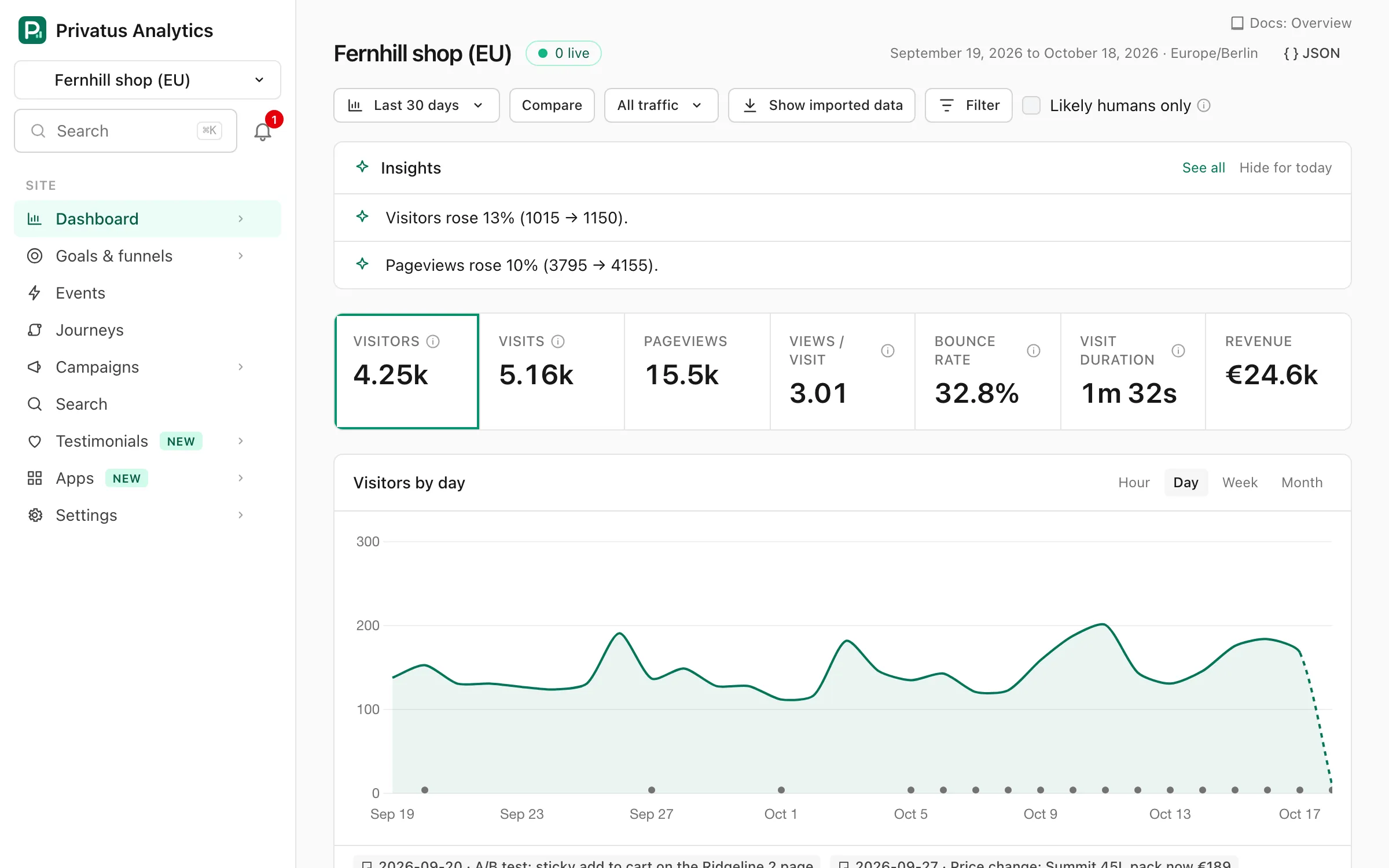
- Visitors, visits, pageviews, bounce rate and visit duration on the Overview.
- Sources and channels, including a separate channel for AI assistants such as ChatGPT and Perplexity.
- Pages, entry and exit pages, countries, languages, devices, browsers, operating systems and UTM campaigns.
- Time on page and scroll depth from the
engagemodule, which is on by default. - Real-time visitors on the Live page.
Add custom events, goals and funnels when you're ready.
How it stays private#
- No cookies,
localStorage,sessionStorageor IndexedDB. The only exception is a flag a visitor sets themselves when they opt out. - The visitor's IP address and User-Agent are used in memory to filter bots and to work out the device and a daily visit key, and are then dropped. They are never written to disk or logs. Location is the country only.
- Every visitor, including visitors from the EU, UK and Switzerland, is processed in our US region. Only the minimized event is stored.
Read how it works for the full picture, and how visitors are counted for the details of visits and visitors.
Sign up for Privatus Analytics with Google, GitHub, Apple or just your email (no password needed) and create a workspace for your sites and team.
Add a website to Privatus Analytics: set its domain, additional domains, timezone and currency, and find the site id for the tracking snippet.
Check that the Privatus Analytics tracker is installed and hits are arriving, with the automatic check, the Live page or your browser's network tab.
Track conversions with a goal: count a thank-you page visit or a custom event such as a signup, match paths by prefix, glob or regex, and see all your history.
Invite team members to your analytics workspace, give each a role from owner to viewer, limit which sites they see, or share a dashboard without an account.