UTM campaign tracking
Track UTM campaigns with visitors, conversions, revenue, cost, CPA and ROAS, build tagged links with the UTM builder, and clean up near-duplicate UTM values.
Campaign report#
Watch: Campaign tracking: which marketing campaigns make money (2:13)
Campaign tracking that shows which campaigns make money: visitors, sales, conversion rate, revenue and return on ad spend side by side, counted by you.
Transcript
You spent money on five campaigns last month. Which one actually paid for itself? If you don't know, next month's budget is a guess.
I'm James, founder of Privatus Analytics. Let me show you how to know for certain.
Here's where you look today. The ad platform's own dashboard. It tells you the campaign brought a thousand clicks and a great cost per click. It's grading its own homework. Clicks aren't customers. The campaign that brought the most traffic is often not the one that sold. So the loud campaign gets more money, and the quiet one that was actually converting gets cut. Your own data isn't much help, because your links are a mess. One person typed Facebook, another typed facebook, and now one campaign is two rows. And to join clicks to sales, the ad platforms want their pixel on your site, following your visitors around the web so they can take credit. You end up with numbers written by the people you're paying, and a budget decided by whoever shouts loudest.
With Privatus Analytics, it starts with clean links. The builder fixes capitals and spaces, and a shared library means nobody types one by hand again. Then open your campaigns report. Every campaign, side by side. Visitors, sales, conversion rate and revenue. Now the truth shows. The campaign with the most traffic often isn't the one that sold. Add what each campaign cost, and you see your cost per customer and your return on ad spend, counted by you, not by the platform. No pixel follows your visitors anywhere. There's no cookie, so every visitor from every campaign is counted, not just the ones who clicked accept. Short on time? Ask Claude or ChatGPT, over MCP, which campaign deserves more budget.
Your budget goes to what works. You know which campaign brought the customers, and what each one cost you, from numbers nobody else wrote. And your visitors aren't followed around the internet so an ad platform can take the credit.
Put next month's budget where it pays. Start free at privatusanalytics.com.
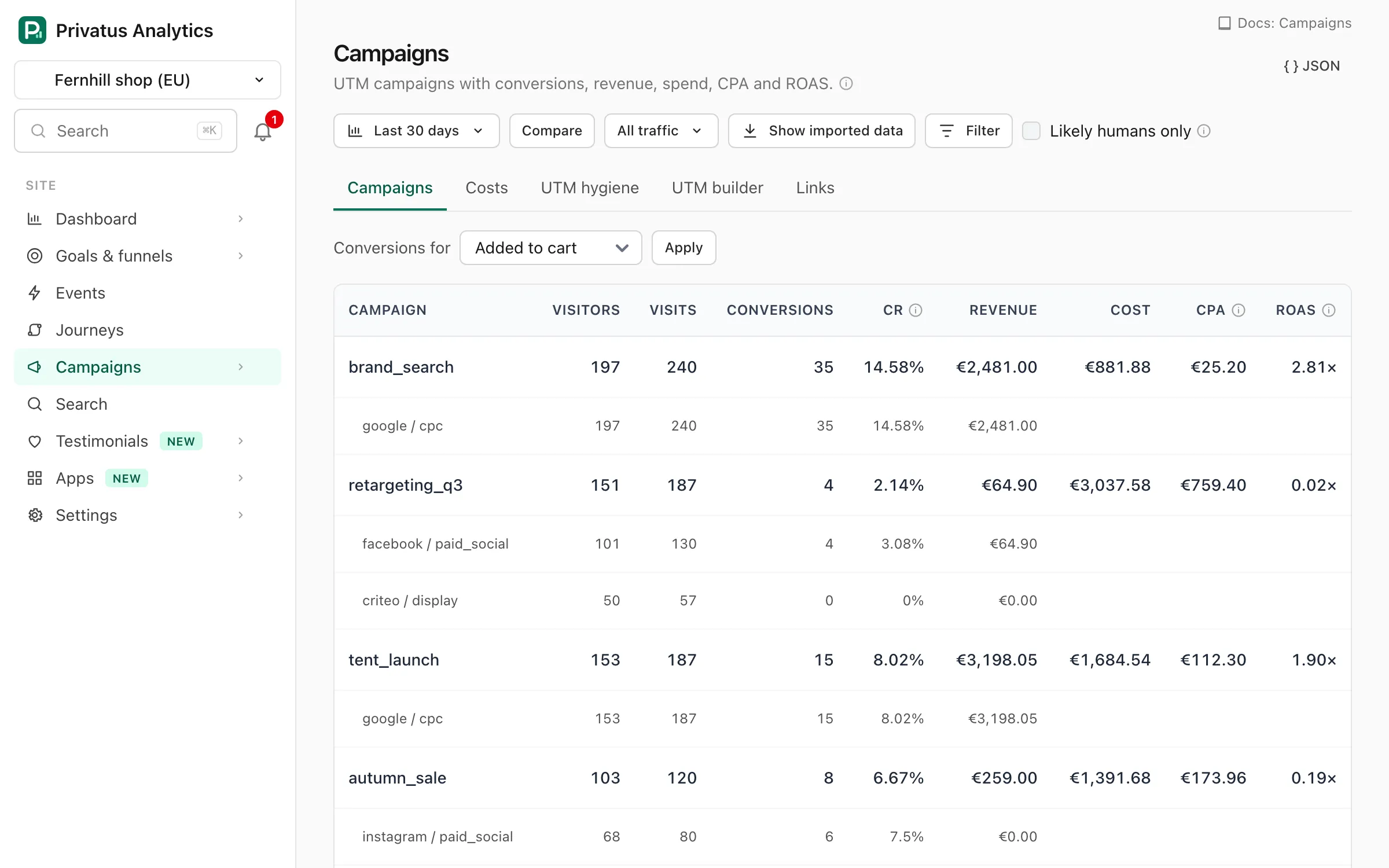
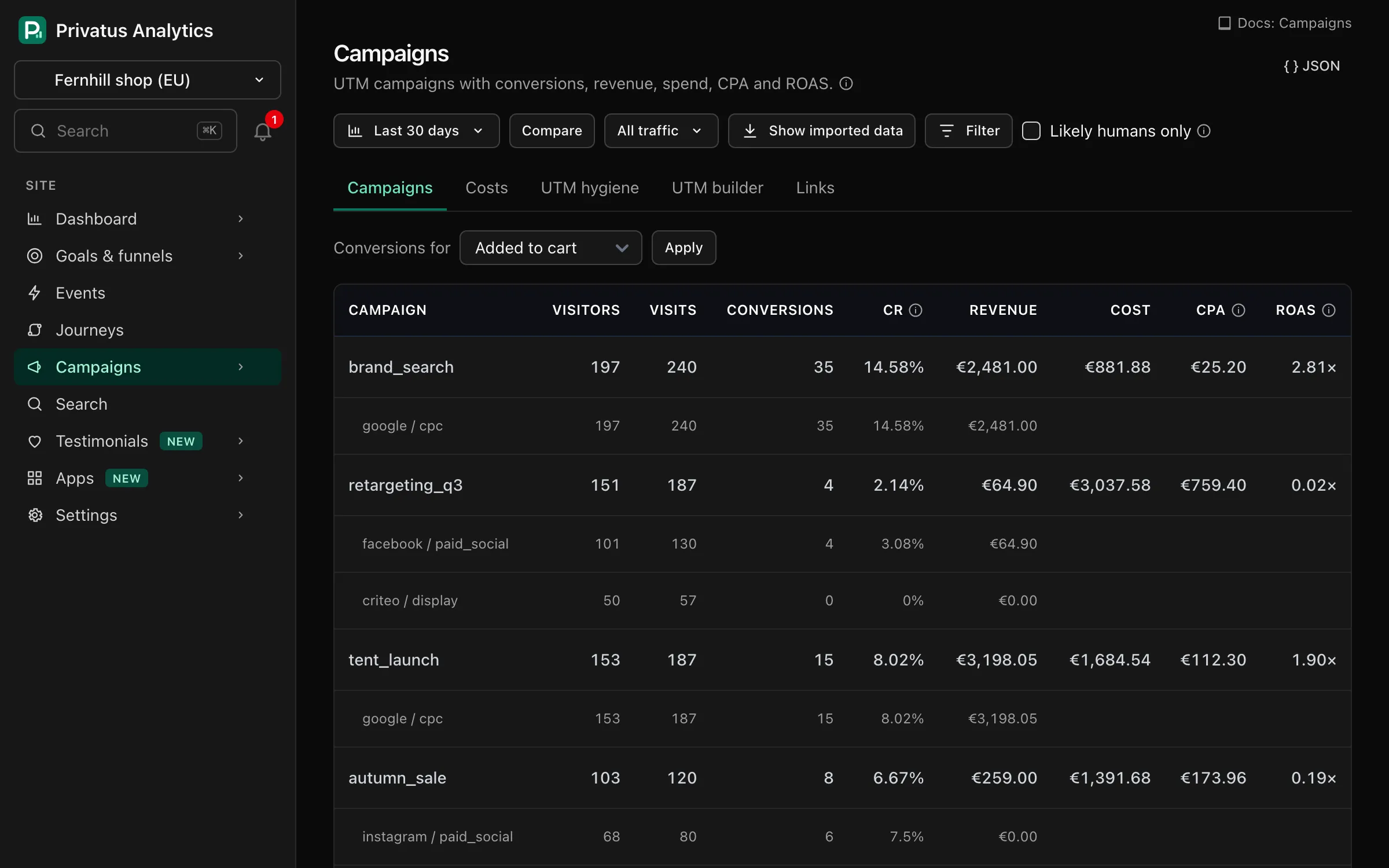
Campaigns rolls UTM-tagged traffic up by campaign, then source and medium, with visitors, visits, conversions, conversion rate, revenue and, when you add costs, cost, CPA (cost ÷ conversions) and ROAS (revenue ÷ cost). It lists the 100 busiest campaigns, with a total row.
Conversions are counted for one goal. Choose it under Conversions for (the first active goal by name is used until you do). Without a goal, conversions stay at zero. Revenue is all the revenue of the campaign's visits, whatever the goal.
UTM values come from the landing page of each visit. Values are compared
as sent, so Facebook and facebook are reported as different values
(see UTM hygiene below).
Costs#
Campaign costs, CPA and ROAS are part of the Business and
Enterprise plans. On other plans the campaign report shows visits,
conversions and revenue without them, the Costs tab says which plan has
it, and the cost endpoints respond with 402 with the code plan_limit. Costs
you entered before are kept and are read again when you upgrade.
In Campaigns → Costs, add spend per campaign per month by hand, or
upload a CSV with a header row and the columns campaign, month
(YYYY-MM), amount and, optionally, currency (the upload box shows
the exact template). A file can be up to 1 MB, and its first 5,000 rows
are imported.
Each campaign has one cost per month, so saving or importing the same
campaign and month again replaces the amount. The campaign name is
matched to utm_campaign without regard to case. Without a currency a
cost uses the site currency. Other currencies are converted to it for
the report. Spend with no exchange rate yet is shown in its own currency
and left out of cost, CPA and ROAS. A month's cost is spread evenly over
its days, so a report for part of a month counts part of the cost. A
campaign with a cost and no visits is still listed.
Anyone who can view the site sees the costs. Adding, importing, editing
and deleting them needs the content.write permission.
UTM builder#
Campaigns → UTM builder builds a tagged link from a landing page URL and the five UTM values (source, medium, campaign, content and term), and shows the link as you type. A preset fills in the source and medium:
| Preset | utm_source |
utm_medium |
|---|---|---|
| Newsletter | newsletter |
email |
| Social post | linkedin |
social |
| Paid search | google |
cpc |
| Paid social | meta |
paid_social |
| Print / QR | print |
qr |
| Partner | partner |
referral |
Check link checks every value. Capital letters are lowercased and
spaces become underscores. The landing page URL must start with
https:// or http://. A value that looks like personal data (an
email address, a token, a UUID or other long id, or a long number) is an
error, and no link is built until you remove it.
Copy the link, or use Save to library to keep it in the link library.
Link library#
Campaigns → Links keeps the tagged links your team uses, so everyone copies the same URL instead of typing UTM values again. Save one from the UTM builder with Save to library, or start from New link.
| Field | Rules |
|---|---|
| Name | Required, up to 120 characters. A label for the library, not part of the URL |
| Landing page URL | Required. Starts with https:// or http://, has no spaces and is up to 2,048 characters |
| Source, Medium, Campaign, Content, Term | Optional utm_* values. Saved in lowercase, with spaces turned into underscores, and cut at 255 characters |
| Tags | Optional, separated by commas. Saved in lowercase. A tag is cut at 40 characters and a link keeps its first 20 tags |
| Notes | Optional free text, for example where the link is used |
A link is not saved when its UTM values look like personal data (an email address, a token, a UUID or other long id, or a long number).
The tagged URL#
Every saved link shows its tagged URL: the landing page URL with the link's UTM parameters added. If the landing page URL already has one of those parameters, the link's value replaces it. Other query parameters are kept. Copy puts the tagged URL on your clipboard, from the list or from the link's own page.
Search and tags#
The list shows the newest links first. Search matches the name, the landing page URL and the campaign. Choose a tag from the menu, or click a tag on a link, to see only the links with that tag.
QR codes#
QR code on a link shows a code for its tagged URL, for posters, flyers and packaging. Download SVG saves it as a vector file, which scales to any print size.
Tip: Scan the code with a phone before you send it to print.
Links and reports#
A saved link is the landing page URL itself, not a redirect or a short link, so the library does not count clicks. Visits that arrive through the link appear in the campaign report under its campaign, source and medium, like any other tagged visit. A link with a campaign has a See campaign performance shortcut to that report.
Deleting a link only removes it from the library. Copies already in emails, ads or print keep working, and their visits stay in your reports.
Anyone who can view the site can open the library, copy links and
download QR codes. Saving, editing and deleting a link needs the
content.write permission (see
roles).
UTM hygiene#
Campaigns → UTM hygiene checks the utm_source, utm_medium and
utm_campaign values in the selected period and lists:
- Near-duplicate values that differ only by case, spaces or
punctuation (
Facebookvsfacebook,e-mailvsemail), with the visits for each and a suggested spelling. - Values to tidy that break the lowercase, underscore style (capital letters, spaces, hyphens or other punctuation), with a suggested value. Up to 50 are listed.
- Sources we don't recognize:
utm_sourcevalues that are not on the list of well-known sources. Up to 50 are listed.
The check reads the 500 most visited values of each parameter.
These are suggestions only, and nothing is changed for you. Fix the links at the source (the UTM builder keeps new ones consistent). Set up alias opens Site settings → Channels, where a custom channel rule can put the variants in the same channel.
Tips#
- Use
utm_sourcefor where (newsletter, linkedin),utm_mediumfor the type (email, cpc, social) andutm_campaignfor the campaign. utm_mediumvalues likecpc,paidordisplayput visits in a paid channel, andemailputs them in Email.- Never put personal data (emails, customer ids) in UTM parameters.
API#
The campaign report, costs, builder, hygiene check and link library are
REST resources under /sites/<site id>/campaigns and MCP tools:
| Area | REST path | MCP tools |
|---|---|---|
| Campaign report | /sites/<site id>/campaigns |
campaigns_list |
| Costs | /sites/<site id>/campaigns/costs |
campaign_costs_list, campaign_costs_create, campaign_costs_update, campaign_costs_delete, campaign_costs_import |
| UTM builder | /sites/<site id>/campaigns/builder |
campaigns_builder |
| UTM hygiene | /sites/<site id>/campaigns/hygiene |
campaigns_hygiene |
| Link library | /sites/<site id>/campaigns/links |
links_list, links_get, links_create, links_update, links_delete, links_qr |
links_qr returns the QR code as SVG text. Its optional size is the
module size in pixels, from 2 to 20. The API reference
lists every input.