Advanced Bot Detection and Scoring
Advanced Bot Detection scores every visit for how likely it came from a bot, and catches the bots that run a real browser and pass for people.
Every site gets bots, and far more of them than most owners expect. Scrapers, AI agents, price watchers, ad fraud, vulnerability scanners and uptime tools all load your pages. The simple ones announce themselves and every analytics tool filters them. The rest run a real browser, send an ordinary User-Agent and look like people.
Watch: Bot detection: is your analytics counting bots as people? (2:08)
Bot detection for website analytics: bots that run a real browser and look like people are in your numbers, inflating traffic and dragging down conversions.
Transcript
Some of your visitors aren't people. They're bots that look exactly like real visitors, and your analytics counts every one of them.
I'm James, founder of Privatus Analytics. Let me show you who's really on your site.
Last month your traffic jumped twenty percent. You told the team. Someone celebrated. Then conversions went down. Not because fewer people bought, but because a chunk of that new traffic was never going to buy. It wasn't human. Simple bots announce themselves, and every analytics tool removes them. The sneaky ones run a real browser, load your pages like a person, and pretend to be human. Most tools can't see them at all. So they sit inside your numbers. They inflate your traffic, drag down your conversion rate, and make one campaign look great and another look dead. Every decision after that starts from the wrong number. The budget, the redesign, the report to your boss. And the tools that do try to catch them usually do it by fingerprinting every visitor, which is its own kind of spying.
Privatus Analytics runs machine learning on every single visit. Our own model checks each one the moment it arrives, and labels it likely human, unsure or likely bot. It catches the sneaky bots pretending to be human, and it does it without fingerprinting anyone. Only the score is kept. Never their IP address, never a profile. There's nothing to set up, and nothing is deleted. You decide what to do with it. One click on Likely humans only, and every report shows real people. Your A/B tests too, so a bot never picks your winner. Want to catch even more? Add a honeypot, a hidden page only a bot would ever find. Every bot that walks in helps teach the model. Or ask Claude or ChatGPT, over MCP, how much of last month's traffic was real.
Now you know how many of your visitors are real people. Your conversion rate is one you can believe. And you got there without spying on anyone.
Find out who's really visiting your site. Start free at privatusanalytics.com.
Most analytics tools count those as visitors. That is why a number from another provider is hard to trust: pageviews are inflated, conversion rates are pushed down and campaigns look better or worse than they are, and nothing in the report tells you which visits were real.
Advanced Bot Detection shows you. It is included in the Pro, Business and Enterprise plans, and you find it in the site menu.
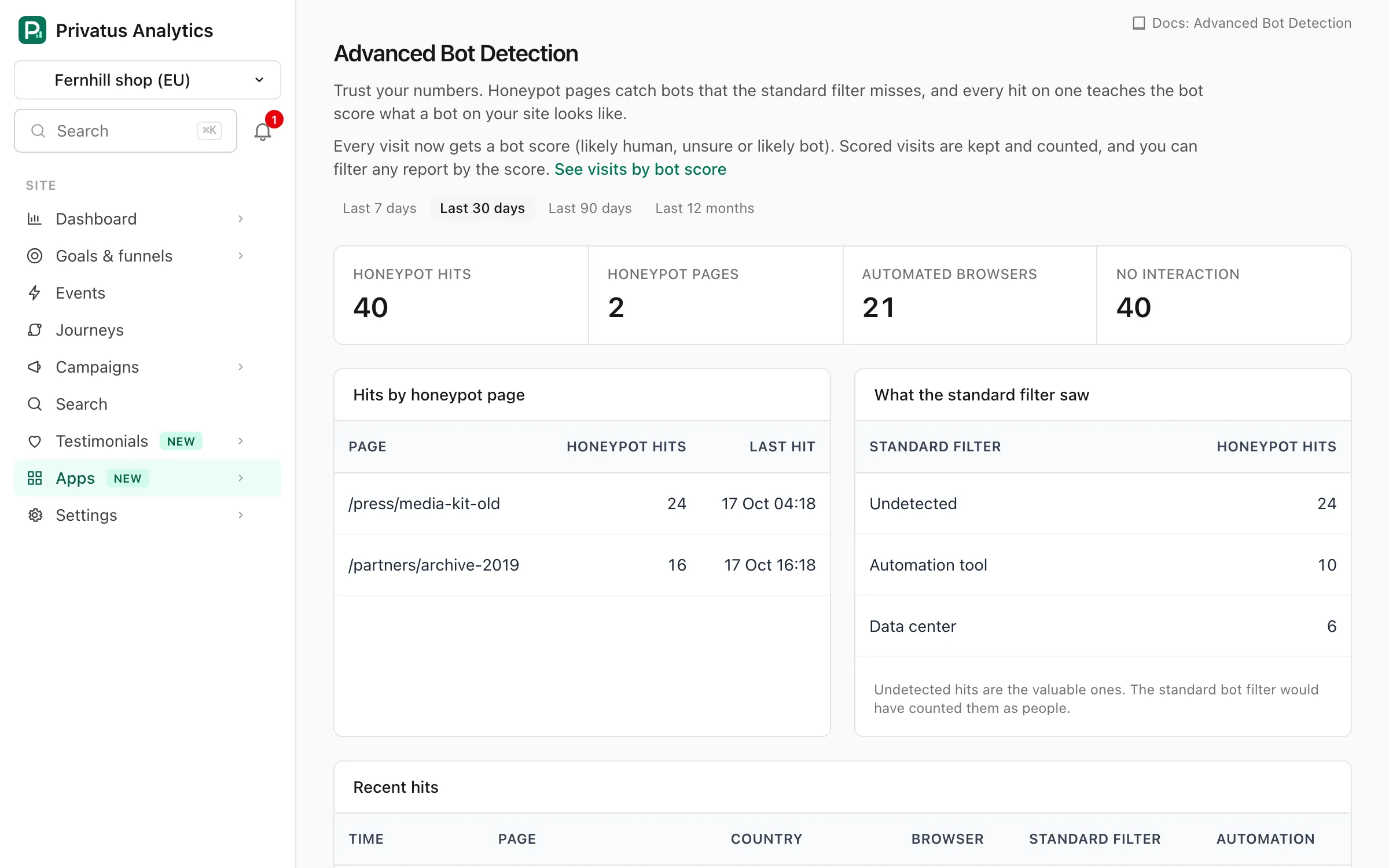
It has two parts:
- The bot score. Every visit gets a score for how likely it came from a bot, and you can filter any report by it. It needs no setup and works from the first visit.
- Honeypots. Pages you set up that only bots can reach. Each bot that walks into one shows the model how bots behave on your site.
The bot score#
When a visit starts, our own machine learning model scores it in real time. Reports show the score as one of four names:
| Bot score | Value | Meaning |
|---|---|---|
| Likely human | likely_human |
The visit looks like a person |
| Unsure | unsure |
The visit shows signs of both |
| Likely bot | likely_bot |
The visit looks automated |
| Not scored | not_scored |
A visit from before your workspace had Advanced Bot Detection. About one in twenty of those earlier visits has a score all the same, from the sample every plan gets |
The score labels a visit and never deletes it. Every visit stays in your reports, so you decide what to do with it: see the bots, compare them with people, or leave them out with one click. The standard bot filter keeps removing known bots before they are counted, as on every plan.
Use it#
- Overview → Technology → Bot score breaks visits down by the four names. Click a row to filter the dashboard by it.
- Likely humans only, the checkbox next to the Filter button on every report, adds the filter Bot score is Likely human in one click. It is hidden while that filter is applied. Remove the filter to get it back.
- To leave likely bots out of a report or an API call, filter with
["bot_score", "is_not", "likely_bot"]. Save it as a segment to reuse it. - Page reports are filtered through the visit: a page view has the bot score of the visit it belongs to.
Filtering and breaking down by bot score is part of Traffic quality, included in the Pro, Business and Enterprise plans.
How it works#
The model is our own technology, built for one job: telling a real browser with a person behind it from a real browser driven by software. It weighs many signals together, including:
- what the browser says it is, and how current it is
- whether the details of the request agree with each other and with that browser
- whether the visit fits the place it comes from
We keep the full list and the way the signals are combined to ourselves, so bot authors have nothing to copy. The signals also change over time: as bots adjust their strategy, the model is retrained to follow them.
Everything is read in memory while the request is handled, and only the score is stored with the visit. The IP address, the User-Agent, the request headers and the time zone are not (see What the tracker sends).
Why it works so well#
- It is trained on a lot of evidence. We combine our own data generation process, analysis by people and by LLMs, and what we see across the very large number of pageviews Privatus Analytics processes.
- Bots get no feedback. A bot gets exactly the same response as a person, and nothing tells it how it was scored. Its author cannot test what gets through, which makes this a game we can win.
- It keeps learning. The model is retrained as new evidence arrives, and your own honeypots sharpen it for the bots that visit your site.
It is a very powerful model, and our tests show very good results at telling bots from people. Every visit is scored for as long as your workspace has Advanced Bot Detection, including visits from browsers that share few details about themselves.
Honeypots#
What a honeypot is#
A honeypot is a link to a page on your site that no person can ever click. The link is in the page HTML, so bots that read the HTML find it. It is hidden from view, from the keyboard and from screen readers.
- A bot reads your HTML and finds the hidden link.
- The bot follows the link and loads the honeypot page.
- The tracking script on the honeypot page tells us about the request.
- We record what the bot looked like.
The tracking script must be installed on the honeypot page. Without the script we never hear about the visit.
Set up a honeypot#
The Advanced Bot Detection page in the app has the exact code for your site, including the snippet that marks a page as a honeypot. This guide covers the parts around it.
Let an AI assistant do it#
The Advanced Bot Detection page has a ready-made prompt under Set this up with your AI assistant. Copy it into an assistant that can edit your site's code, such as Claude Code or Cursor. The prompt holds your site's own honeypot snippet, the steps below and the do's and don'ts from Best practices, and it tells the assistant to check its own work. Read the changes before you publish them.
1. Create the honeypot page#
Make a plain page at an address that looks ordinary. Add the honeypot snippet from the app, and a robots meta tag so search engines never index it.
<!doctype html>
<html lang="en">
<head>
  <meta charset="utf-8">
  <meta name="robots" content="noindex, nofollow">
  <title>Partner archive</title>
  <!-- The honeypot snippet from the Advanced Bot Detection page -->
</head>
<body>
  <h1>Partner archive</h1>
  <p>This page is no longer updated.</p>
</body>
</html>
2. Add the hidden link#
Put the link in the HTML of your real pages, for example in the footer or between two sections.
<a href="/partners/archive-2019" class="site-extra" rel="nofollow"
   aria-hidden="true" tabindex="-1">Partner archive</a>
aria-hidden="true" keeps it away from screen readers, tabindex="-1"
keeps it out of keyboard navigation, and rel="nofollow" tells search
engines not to follow it.
3. Hide the link in your stylesheet#
Hide it with a class in your CSS file, not with an inline style. Simple
bots skip links that have display:none or the hidden attribute right
in the HTML.
.site-extra {
  position: absolute;
  left: -9999px;
  width: 1px;
  height: 1px;
  overflow: hidden;
}
4. Tell good crawlers to stay away#
Disallow the page in robots.txt. Search engines and other well-behaved
crawlers obey it, so the bots you catch are the ones that ignore the rules.
User-agent: *
Disallow: /partners/archive-2019
5. Check it#
Open the honeypot page yourself in a browser. One hit appears in the report within about a minute. That hit is you, so ignore it.
Keep the snippet on honeypot pages only#
Put the honeypot snippet only on a page no person can reach, never on a real page, in your site-wide layout or in a shared template. A hit on a honeypot page is kept for 12 months to train the bot score and is kept out of your statistics. It holds no IP address or User-Agent, only keyed hashes of them that can't be turned back into the values, and the names of the request headers with the few values the model reads (see What we store). Nothing kept can identify a person.
Best practices#
Do#
- Use several honeypots in different places, such as the header, the footer and the middle of long pages.
- Give each one an ordinary address and link text, like an old archive or a partner page.
- Hide the link with a class in your stylesheet, and add
aria-hidden="true",tabindex="-1"andrel="nofollow". - Disallow every honeypot page in
robots.txtand add anoindexrobots meta tag to the page. - Keep the honeypot page small and harmless, with a little plain text and nothing else.
- Change the addresses now and then. Bot authors learn to skip known traps.
- Mention bot detection in your own privacy policy.
Don't#
- Don't put the honeypot snippet on a page people can reach, or in a layout that every page shares.
- Don't list a honeypot page in your sitemap, menus, search results or internal search.
- Don't use words like honeypot, trap or bot in the address, the link text or the class name.
- Don't hide the link only with an inline
display:noneor thehiddenattribute. - Don't leave the link reachable with the Tab key or readable by a screen reader.
- Don't put forms, real content, personal data or links back to your site on the honeypot page.
- Don't block or ban on a single hit. Link checkers, security scanners and browser extensions sometimes follow hidden links too.
- Don't build a maze of pages that link to each other without end. It wastes your server and proves nothing.
The report#
| Part | What it shows |
|---|---|
| Honeypot hits | Hits in the chosen period (7, 30 or 90 days, or 12 months) |
| Automated browsers | Hits where the script saw an automation tool driving the browser |
| No interaction | Hits with no pointer, key or touch input |
| Hits by honeypot page | Each honeypot address, with its hits and last hit |
| What the standard filter saw | How the standard bot filter would have judged each hit. Undetected hits are the valuable ones: the standard filter would have counted them as people |
| Recent hits | The latest 50 hits with time, page, country, browser and automation |
Honeypot hits are never counted as pageviews or visits, and they do not use your monthly events.
What we store#
For every request, the IP address and User-Agent are used in memory while the hit is processed and are never stored. That includes honeypot hits.
| Stored with a honeypot hit | Why |
|---|---|
| A keyed hash of the IP address and a keyed hash of the User-Agent | To group hits from the same client when the model is trained |
The names of the request headers, in order, and the values of accept-language, priority, sec-ch-ua, sec-ch-ua-mobile and sec-ch-ua-platform |
What the bot score model learns from |
| Time, page, referring site, country, browser and major version, operating system, device | The report and training |
| What the standard bot filter made of the hit, and whether it came from a data center | The report and training |
| Automation signal, interaction, screen width, language, time zone, engaged time, scroll depth | What the script saw on the page |
The hashes. Each one is an HMAC-SHA256 cut to 128 bits (32 hexadecimal characters). The IP address and the User-Agent each have their own key, derived from a secret that never leaves our application. Without the key, a hash can't be reversed, and it can't be recomputed from a guessed IP address. The same value always gives the same hash, which is how training knows that two hits came from the same client. The hashes are used for nothing else.
The headers. The five values say which language the browser prefers, the priority of the request, the browser's brand and version, whether it is a mobile browser and its operating system. Every other header keeps its name with an empty value, so the User-Agent and the referring address are not in it. Cookies, authorization headers, headers that hold the client's address and headers added by our proxies are dropped, names included.
Challenge pages. With Advanced Bot Detection, a hit from a "confirm
you're human" page (data-hp="ch") is stored in the same way. A site
shows such a page to a random few visitors, so unlike a honeypot hit, this
hit can come from a person. It is left out of the honeypot report, is
never a pageview or a visit and does not use your monthly events.
The hashes and headers are never shown in the app or returned by the API or MCP. A hit is deleted after 12 months. When you delete a site, its hits are deleted with it in the daily cleanup 7 days later. The private copy of this data that we train from is replaced every night, so a deleted hit leaves it within a day.
No browser fingerprint#
A honeypot page loads the same script as every other page. It does not read the graphics card, the number of processor cores, device memory, plugins or window sizes, and there is no canvas, audio or font fingerprint.
A sentence for your own privacy policy#
We use hidden pages that people cannot reach to detect automated traffic. If automated software requests one of these pages, our analytics provider, Privatus Analytics, keeps a record of that request for up to 12 months to tell bots from people. The record holds technical details such as the page, country, browser, language and time zone, and keyed hashes of the IP address and user agent. The IP address and user agent themselves are not stored.
If your site uses challenge pages, add:
We show a random few visitors a page that asks them to confirm they are human. A record of that request is kept in the same way.
API and MCP#
The bot score is the bot_score dimension of the stats endpoints and
tools: break down by it with GET /sites/{site_id}/breakdown/bot_score.json
(MCP stats_breakdown), or pass it as a filter. The
API returns the name (likely_bot), never the number.
GET /sites/{site_id}/bot-detection.json and the MCP tool
bot_detection_report return the honeypot report. Both are included in
the Pro, Business and Enterprise plans (other plans get 402 with the code
plan_limit).