Alerts
Analytics alerts that tell you when something changes
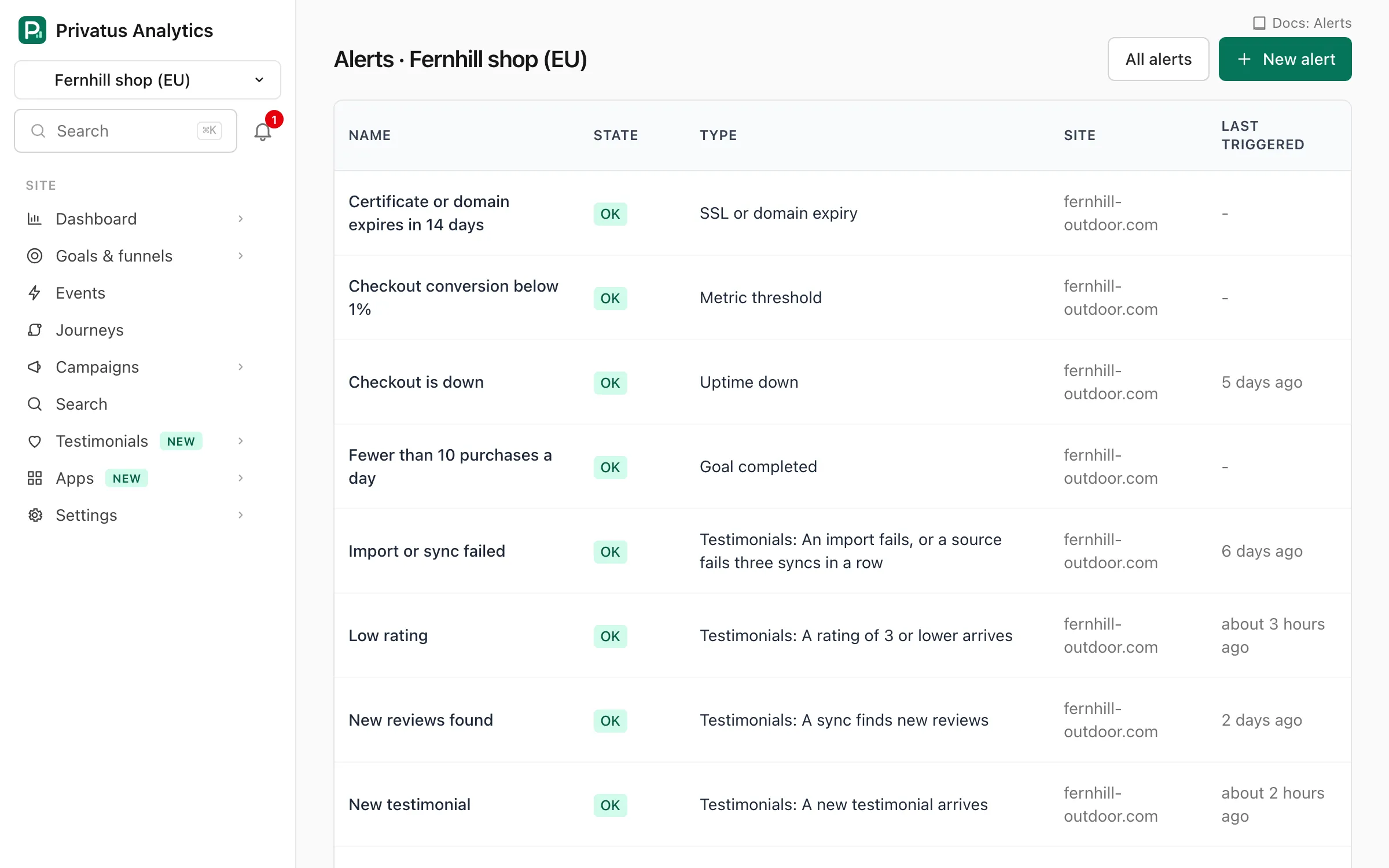
An alert is a rule that is checked every 5 minutes. When its condition becomes true your channels are notified once, and you get a "Back to normal" message when it clears. Email alerts are on every plan.
No card required. Set up in 60 seconds.
Nine kinds of rule
Metric thresholds, anomalies, goals, new referrers, a missing script, plan usage, downtime, SSL or domain expiry and Web Vitals.
Alerts on a change
Compare a window with the one before it, or with the same window a week earlier, and trigger on a percent change.
Part of your traffic
Count only the visits in a shared segment, such as one page, one source, one campaign or one country.
Quiet when it should be
One notification when a rule triggers, mutes for planned work, and limits that stop a flapping rule from flooding an inbox.
Rules for what matters
Pick a site, a rule type and a window from 15 minutes to 7 days. An anomaly rule needs no threshold. It compares the window with the same window in each of the previous 4 weeks, at the sensitivity you choose.
- Visitors, visits, pageviews, bounce rate or conversion rate above or below a value
- A goal completed a number of times, or no hits from the site for a number of hours
- A new referrer that starts sending visitors, with an optional minimum Domain Rating
- An uptime check that is down, or a certificate or domain about to expire
- LCP, INP, CLS, FCP or TTFB at the 75th percentile past a limit
Channels by plan
Channels are set up once per workspace and reused by any rule. Email is on every plan, with up to 20 addresses per channel. Pro adds Slack, Microsoft Teams, Discord, webhooks and browser push. Business adds PagerDuty and Opsgenie.
Noise control
Mute an alert for an hour, a day or a week. A muted alert is still checked and still records history. Only its channels stay silent.
- A history of every time an alert triggered and when it resolved
- Acknowledge an incident to show the team someone is on it
- An unsubscribe link in every alert email
For your own tools
Every triggered or resolved alert is also sent to the workspace's webhooks, and alerts can be created and changed over the API and MCP. The alerts docs list every rule setting.
Watch: Traffic alerts: know in minutes when signups drop (2:13)
Traffic alerts that tell you in minutes, not on Monday, when signups drop, a checkout breaks or your site goes down. One message, then an all clear.
Transcript
Your signups dropped to zero on Friday night. You found out on Monday. That's a whole weekend of sales, gone.
I'm James, founder of Privatus Analytics. Let me make sure that never happens to you.
Here's how a weekend like that happens. A deploy on Friday afternoon breaks the checkout button. Nothing crashes, nothing errors, the page just stops converting. Nobody watches a dashboard on a Saturday. So the first sign is a customer email on Monday, or worse, a quiet month-end. It isn't only breakages. A tracking script goes missing after a redesign and you lose two weeks of data. A post takes off and you find out after the moment has passed. You tried alerts before. They pinged you for every wobble, ten times a day, until you muted them. Then the real one came and you missed it. Or you bolted on a monitoring tool, with its own script on every page and its own bill, to watch a number your analytics already had. Every hour something goes unnoticed costs you money, and you've got no way to notice.
With Privatus Analytics, tell it what matters, and it keeps watch every five minutes. Traffic, signups, sales, a new site linking to you, or your site going down. Don't know what normal looks like? You don't have to. It compares today with the same time over the last four weeks and spots anything unusual, good or bad. You hear about it once, and again when things are back to normal. No flood of messages. It watches your site being up as well, and warns you before your certificate or your domain expires. No extra script, no extra tool. Alerts arrive by email, Slack, Teams, Discord, or a push to your browser. Or tell Claude or ChatGPT, over MCP: alert me if traffic drops. Done.
You hear about problems in minutes, not on Monday. A broken checkout gets fixed while there's still a weekend to save. And you only get the alerts that matter.
Set your first alert before the weekend. Start free at privatusanalytics.com.
Privacy by design
No cookies, no fingerprinting, no profiles. IP addresses are used in memory and never stored.
Start free, upgrade when you grow
Your first workspace gets 14 days of Pro, with no card. After that, stay on Free or pick a plan.
Business
From $49 a month
250k events a month
For agencies, larger teams and security requirements.
Questions and answers
How quickly does an alert fire?
Rules are checked every 5 minutes.
Which channels can alerts use?
Email on every plan. Slack, Microsoft Teams, Discord, webhooks and browser push on Pro and up. PagerDuty and Opsgenie on Business.
Will I get the same alert over and over?
No. Channels are notified once when a rule triggers and once when it goes back to normal. Email is also limited per alert and address.
Start free in 60 seconds
Add one script tag and see your first visitor within seconds. Free for your first 10k events a month.
No card required. Set up in 60 seconds.