Data exports and warehouse sync
Export aggregated tables, raw events or a dashboard bundle as CSV, JSON or XLSX, or sync analytics data daily to S3, BigQuery, Snowflake or Azure Blob Storage.
Quick exports#
Every drill-down table has a CSV button that downloads the table as shown, with the current date range and filters (up to 1,000 rows). For anything bigger, use the export builder.
Export builder#
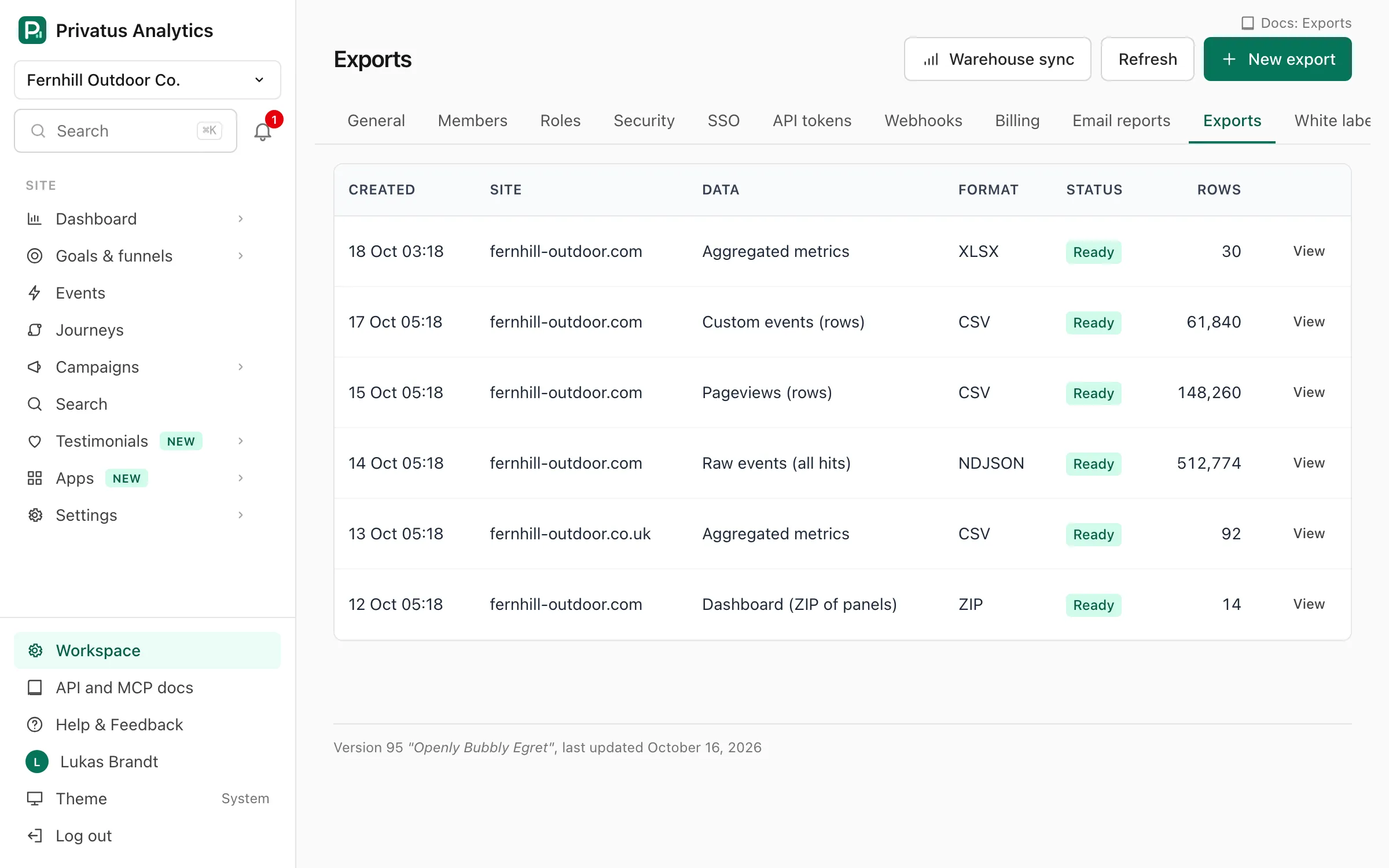
Exports → New export (workspace menu). It needs the
analytics.export permission.
| Data | What you get | Formats | Plan |
|---|---|---|---|
| Aggregated metrics | Metrics per time bucket, optionally split by dimensions | CSV, JSON, XLSX | All |
| Pageviews (rows) | One row per pageview with the fields you choose | CSV, JSON, XLSX | Pro and up |
| Custom events (rows) | One row per custom event, with its properties | CSV, JSON, XLSX | Pro and up |
| Raw events (all hits) | Every stored hit: pageviews, events, engagement, vitals and clicks | CSV, NDJSON | Pro and up |
| Imported data | The daily stats imported from other tools | CSV, JSON, XLSX | All |
| Dashboard | A ZIP with one CSV per Overview panel (top 100 values each), plus the totals and the chart | ZIP | All |
| Setting | What it does |
|---|---|
| Site | The site to export. One site per export |
| From and To | The date range, up to 400 days (93 days for raw events) |
| Timezone | The timezone the dates are read in. Defaults to the site's timezone |
| Grouping | The time bucket: hour, day, week, month, quarter or year. Aggregated and dashboard exports |
| Dimensions | Up to 6 dimensions to split by. Leave empty for totals per time bucket. Aggregated and imported exports |
| Metrics | Visitors, visits, pageviews, bounce rate, visit duration, views per visit and revenue. Leave empty for all. Aggregated exports |
| Fields | The columns of a row export. Leave empty for the default columns. The visit id is only included when you tick it |
| Filters | Optional filters as JSON, in the dashboard's format, such as [["country","is","US"]]. Not used by imported exports |
| Segment | Optional saved segment id (seg_…). Its filters are added to yours |
There is no IP address or User-Agent column, because they are never stored. An XLSX file holds up to 1,048,575 rows. Use CSV for more.
Preview shows the first 20 rows and an estimated row count before you
start. Exports run in the background, and a workspace can have 5 queued or
running at once. You get an email (and an export.ready
webhook if configured) when the file is ready. The
file is kept for 7 days and then deleted.
Properties you haven't marked as No personal data under Events → Property settings are left out of row exports and warehouse syncs.
Testimonials#
A file of a site's testimonials is not made in the export builder. It
starts from the Export action of the Inbox
(Bulk actions), for the rows
you ticked or for everything a filter matches, and is then listed here
like any other export: it runs in the background, counts toward the 5
exports in progress, sends the same email and export.ready webhook, and
its file is kept for 7 days.
- Formats: CSV, JSON, NDJSON or XLSX.
- Rows: one per testimonial. Nothing in the trash is exported.
- Columns:
id,status,kind,rating,title,text,highlight,language,received_at,added_at,source,source_name,source_url,verified,pinned,person_name,person_title,person_company,person_company_url,tags,collections,used_count, then one column per custom property (property.<key>). - The person's email (
person_email) is a column only when the member who asked for the file holdscontent.write.
Over the API and MCP it is exports_create with kind: "testimonials"
and either ids (up to 100 testimonial ids) or filters.
Warehouse sync (Business)#
Send each day's raw events to your own storage. Add a destination under
Exports → Warehouse sync. It needs the workspace.manage permission.
| Destination | Settings | What is written |
|---|---|---|
| Amazon S3 or S3-compatible (Google Cloud Storage interoperability, Cloudflare R2, MinIO) | Bucket, access key id and secret access key. Optional region, path prefix and https endpoint (for S3-compatible storage) |
One gzip NDJSON file per site and day: <prefix>/site=<site id>/date=<date>/events.ndjson.gz |
| Google BigQuery | A service account JSON key with BigQuery Data Editor, the dataset and the table. Optional project id (default: the key's) | Rows added to the table |
| Snowflake | Account, user with key-pair authentication, PEM RSA private key, database, schema and table. Optional virtual warehouse and role | Rows added to the table |
| Azure Blob Storage | A container SAS URL with create and write permission. Optional path prefix | One gzip NDJSON file per site and day, at the same path as S3 |
Each destination also has a name and a list of sites. Leave every site unticked to send all sites, including ones added later. The type can't be changed after the destination is created.
A sync runs every day at 02:00 UTC and sends the previous UTC day. The first one runs at the next 02:00 UTC. Sync now sends yesterday right away. Credentials are stored encrypted and are never shown again: leave a secret field blank to keep the saved value.
Each row is one stored hit: site_id, occurred_at, kind, name,
visit_id, the page, referrer and UTM fields, country, language,
device, browser and operating system, engagement, revenue, and props as
JSON.
When a sync fails#
The destination shows the error, and the sync is tried again every hour. Days are sent in order, oldest first, and a retry carries on where the failed sync stopped, so BigQuery and Snowflake do not get rows twice.
A day that keeps failing does not hold up the days after it. Once it has
failed three times and a newer day is due, the newer days are sent, the
error names the day that was not, and that day is tried again with each
daily sync. It is given up 7 days after its first attempt. So if your
warehouse is unreachable for more than 7 days, the oldest days of the
outage are not sent on their own: send them with a manual sync for that
day (POST /warehouses/<id>/sync with date).
One sync runs per destination at a time. A manual sync that you start while another one is running waits for it and runs next. A workspace can start 30 manual syncs an hour.
Testimonials#
Testimonials are not in the export builder. Export them from the Inbox (a selection or everything a filter matches) and export their numbers from the Analytics tab. Those files are listed here with the rest, and are deleted 7 days after they are made.
API#
Exports are a REST resource under /workspaces/<workspace id>/exports
(create, list, preview) and /exports/<export id> (show, download,
delete). Warehouse destinations are under
/workspaces/<workspace id>/warehouses. See the
API reference. Exports and API calls don't count toward your
usage.