A/B tests and split URL experiments
Run A/B and split URL tests without cookies: send a share of a page's visitors to a variant page and compare conversion rates on a goal.
An experiment answers one question: does a different version of a page get more people to do what you want? Privatus Analytics sends a share of the page's visitors to another version, counts how many of each group reach a goal, and tells you when one version has won.
Watch: A/B testing without cookies (no consent banner needed) (2:21)
A/B testing without cookies: run a split test on the script already on your site, every visitor in the test, no consent banner, and only real winners.
Transcript
You changed your headline last month. Did it sell more, or did it just feel better? If you don't know, every change you make to your site is a gamble.
I'm James, founder of Privatus Analytics. Let me show you how to stop gambling.
Here's how it usually goes. You rewrite the page. You watch the chart for a week. It looks a bit better. Someone on the team says it worked. Then next month it's back where it was, and nobody knows if the headline did anything at all. So you change something else. And something else. Every one of them a guess. You tried a testing tool once. It needed a cookie to remember who saw what. That meant a consent banner, and everyone who clicked no was left out of the test. The test only counted the people who said yes. It was another subscription too, on top of your analytics, for a question you ask a few times a year. And the time it did show a winner, you called it after three days, on a lucky streak that never held up. So you went back to guessing. And every guess costs you a month of sales you can't get back.
With Privatus Analytics, the test runs on the script that's already on your site. Nothing to install, nothing extra to pay for. Pick the page, add your new version, and say what counts as a win, like a sale. Press Start. No cookies, so no banner, and every visitor is in the test, not just the ones who clicked accept. Then you wait, and the result is one you can trust. In this example, the new checkout converts at 9.3 percent, against 5.4 for the original. That's 72 percent more sales from the same traffic. A winner is only called when it's real. Never after three days on a lucky streak, and never because of bots, which machine learning filters out of every visit. When it wins, every visitor goes to the winning version straight away, before you've touched your site.
That headline you changed last month? Now you'd know, in one number, whether it sold more. Every change becomes a test instead of a gamble. And every visitor counts, with no banner in sight.
Test the change you've been wondering about. Start free at privatusanalytics.com.
It works without cookies, without anything stored in the visitor's browser and without a visitor id. You don't need another tool.
To test the banner ads you show on your own site instead of a page, see ad experiments.
How it works, in one minute#
- You have a page, for example
/pricing. This is the original. - You build another version of it as its own page on the same site, for
example
/pricing-b. This is a variant. You can have several. - You create an experiment that names the original, the variants and a goal, such as "Signed up".
- You press Start. From then on, each visitor who opens
/pricingis given one of the pages. Visitors given a variant are sent to it. - Privatus Analytics counts the visits to each page and how many of them reached the goal afterwards.
- When the result is clear enough, the experiment ends by itself and you get the results by email.
Plans#
| Free | Pro | Business and Enterprise | |
|---|---|---|---|
| Experiments at a time, per workspace | 1 | Unlimited | Unlimited |
| Pages per experiment | 2 (the original and one variant) | Up to 10 | Up to 10 |
| Shares you set per page | Yes | Yes | Yes |
| Significance, chance to beat the original, minimum visits, preview links | Yes | Yes | Yes |
| Results by email | Yes | Yes | Yes |
| Steer to the leader (automatic shares) | No | Yes | Yes |
| Choose who takes part (device, country, source) | No | Yes | Yes |
Many pages at once with * |
No | Yes | Yes |
| More goals and revenue per visit | No | Yes | Yes |
| Results broken down by device, source and country | No | Yes | Yes |
| Scheduled start and exclusive groups | No | Yes | Yes |
| Results to Slack, Teams and Discord | No | Yes | Yes |
| Count likely humans only | No | Yes | Yes |
An experiment that has ended does not count toward the limit, so on the Free plan you can run one test after another.
A setting your plan does not include is shown switched off in the form, and says which plan has it when you point at it. After a downgrade nothing is deleted. An experiment the plan no longer covers is locked: it sends nobody anywhere and counts nothing until you upgrade or remove the settings the plan lacks.
Before you start#
- The tracking code is on the original page and on every variant page. Without it nothing is counted. See adding a site.
- Each variant is a real page of the same site, at its own path. Privatus Analytics does not edit your pages. It only decides who sees which one.
- You have a goal, or you create one from the experiment form with New goal. The goal should be something that can happen in the same visit, such as a signup, a purchase or reaching a thank-you page.
Create an experiment#
Open Experiments from the site's Apps page and click New experiment. Every field has an (i) that explains it.
The name is at the top, and the settings are in four tabs: Pages, Goal, When it ends and Who takes part. Only the first two need filling in. The other two start with defaults that suit most tests. Save keeps every tab, whichever one is open. If a setting is missing or wrong, its tab opens and shows it.
| Field | What it does |
|---|---|
| Name | Your own name for the test. Only your team sees it |
| Original page | The path of the page as it is today, such as /pricing. It starts with a slash and has no domain and no query string. /pricing and /pricing/ are the same page |
| Pages | One row per version. The first row is always the original. Each other row has a name and the path of the variant page |
| Share % | The percent of the test's visitors each page gets. All rows must add up to 100. Leave every one empty for an even split |
| How visitors are shared | Shares I set keeps your percents. Steer to the leader moves them by itself (see Automatic steering) |
| Goal | The action that decides the winner. New goal creates a page or event goal without leaving the form |
| Also report on | More goals shown next to the main one. They never decide the winner |
| Shortest duration | No winner is called before this many days, however good a page looks. Default 7 |
| Longest duration | The experiment ends after this many days even with no winner. Default 30, up to 90 |
| Visits needed per page | Each page needs this many visits before a winner can be called. Default 100 |
| Confidence to win | How sure the result must be: 90%, 95% (the default) or 99% |
| Visitors taking part | The percent of the page's visitors who are in the test at all. The rest see the original and are not counted |
| Devices, Countries, Sources | Only these visitors take part. Leave empty for everyone |
| Start at | Makes the experiment wait for a date and time after you press Start |
| Exclusive group | Experiments with the same group name never share a visitor |
| Send everyone to the winner | On by default. See When it ends |
A new experiment is saved as a draft. A draft sends nobody anywhere.
Rules the form checks#
- A path can only be a page of the same site. An experiment can never send a visitor to another website.
- Two running experiments can't test the same page, and a page can't be the variant of one experiment and the original of another, which would send visitors around in a circle.
- An experiment has between 2 and 10 pages, each with its own name and path.
Set it up: three steps#
After you save, the experiment's page shows the three steps.
1. Check each page#
Each page has a preview link. It is the address of the original page
with ?pa_preview= and the id of a version. Opening it shows you that
version exactly as a visitor would get it, redirect included, and counts
nobody. Preview links work before the experiment starts, so you can check
everything first.
2. Optional: add the script for no flash#
Your tracking code already runs the experiment. If you do nothing else, it works. The tracking code loads after the page, though, so a visitor who is given a variant sees the original for a moment before they are sent on.
To avoid that, copy the script from the experiment's page and paste it in
the <head> of the original page only, above other scripts and
stylesheets. Paste it exactly as it is:
- Keep it inline. Don't add
asyncordeferto it, and don't move it into a bundle or a tag manager, or it runs too late to help. - Don't add it to the variant pages.
- You can put it on every page of the site if that is easier. It then does nothing on pages that are not being tested.
What the script does:
- It hides the page and starts a one-second timer. This part needs no network.
- It loads a small file from Privatus Analytics that lists the pages with a running experiment.
- On a tested page it asks which version this visitor gets, then either sends them to the variant or shows the page.
- If Privatus Analytics is slow or can't be reached, the timer shows the original page. Your page can never stay blank waiting for us.
If your site sets a Content Security Policy, allow
this inline script, and https://privatusstats.com in script-src and
connect-src.
The experiment's page also has a prompt for an AI assistant that can edit your site's code. It carries the script and these instructions.
3. Press Start#
Visitors begin to be shared out at once. Starting is always done by a person in the app. An AI assistant connected over MCP can create and edit an experiment but can't start, end or delete one.
How visitors are shared out#
Privatus Analytics never stores anything in the visitor's browser, so it can't remember a visitor the way a cookie would. It works the version out again each time, the same way every time:
- For each request it combines a secret that belongs to the experiment with the visitor's IP address and browser string, and turns the result into a number.
- The number decides the version. The same visitor gets the same number, so they get the same version on every visit for the whole experiment.
- The IP address and browser string are used in memory for that one request and are never stored. The number is never stored either. The only thing kept is which version a visit saw.
What this means in practice:
- A visitor keeps their version as long as they use the same network and browser. Someone who moves from home wifi to mobile data, or switches browser, can get another version. Without cookies there is no way around this, and each visit is counted for the version it actually saw, so the numbers stay honest.
- Results are counted per visit, not per person. A person who comes back the next day is a new visit.
- Each experiment has its own split. Being in one group of one test says nothing about the group in another.
Who takes no part#
These visitors always see the original page and are not counted:
- Visitors outside the Visitors taking part percent.
- Visitors who don't match the devices, countries or sources you chose.
- Visitors who send Do Not Track or Global Privacy Control, when the site is set to honor it.
- Visitors who opted out of tracking on your site.
- Everyone, while collection is paused because the workspace reached its monthly allowance. Nothing could be measured, so nobody is redirected.
Bots and search engines#
A visitor that says it is a bot is never sent to a variant: a search engine crawler such as Googlebot or Bingbot, a headless browser, or a request with no User-Agent always gets the page it asked for. That way a search engine indexes your original page, never a variant you are only testing. The experiment reads the User-Agent for this, not the bot score. Bots are also filtered out of the counts as usual, so they don't affect the results.
What is counted#
- A visit is counted once per experiment, for the version it saw.
- A visit is counted only when it saw the version it was given.
Someone who follows a link straight to
/pricing-band was not given that version is not part of the experiment. - A conversion counts only after the visit saw its version, and only in the same visit. A signup from earlier in the visit is not credited.
- A redirected pageview is not stored. When a visitor is sent on to a variant, the pageview of the original is dropped, so it is not counted toward your allowance and the visit starts on the variant page. The visit keeps the source it really came from (search, an ad, another site).
- Preview visits are never counted for the experiment.
Reading the results#
The list of experiments shows, for each one, the visits, conversions and conversion rate of all its pages together, so you can see at a glance how much a test has gathered. Open an experiment to compare its pages.
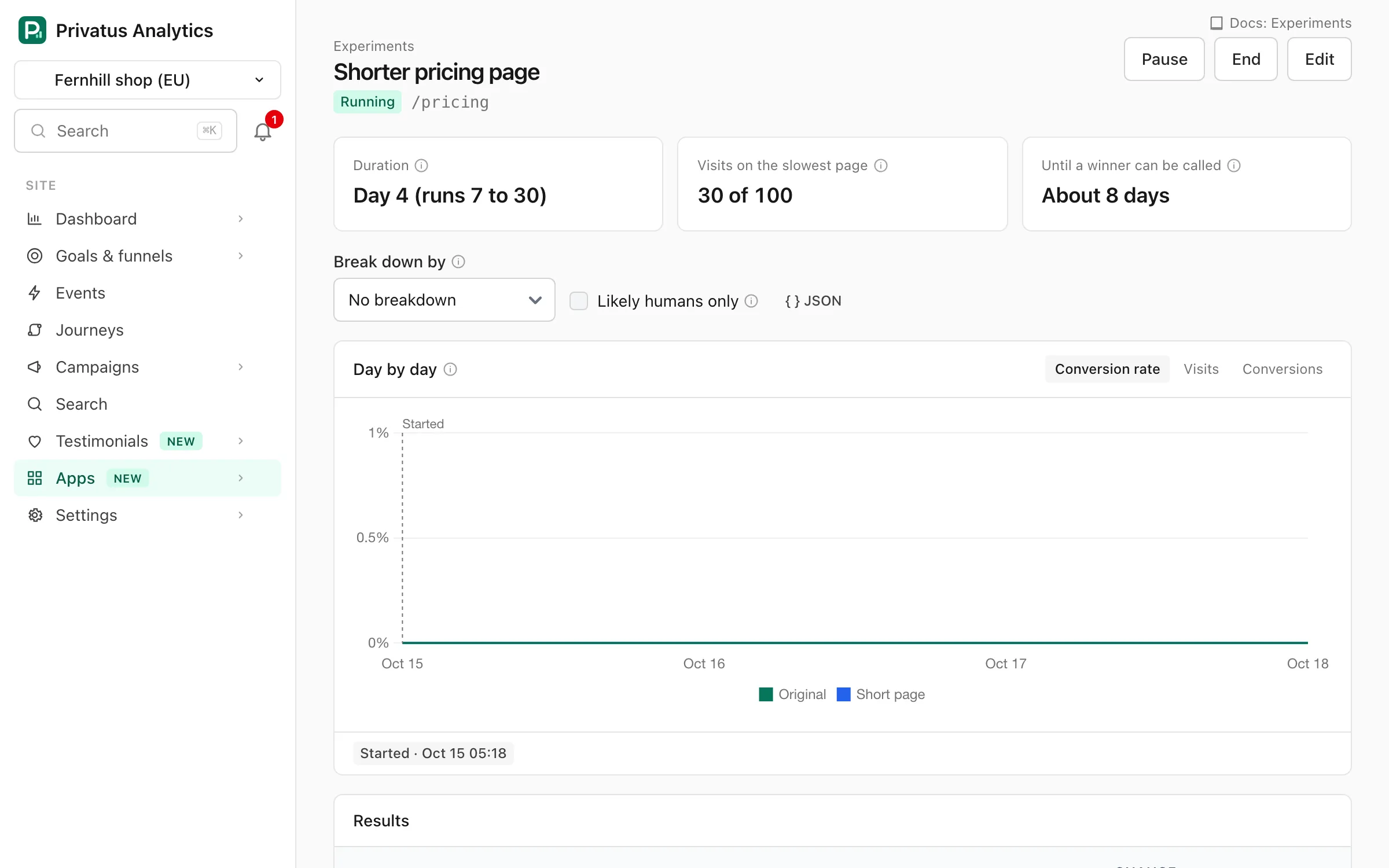
The experiment's page shows where it stands and compares the pages.
The chart
Above the table, Day by day draws one line per page for every day since the start, in the site's timezone. The buttons switch between:
| Line | Meaning |
|---|---|
| Conversion rate | The rate of everything up to that day. The lines jump around at first and settle as visits come in |
| Visits | The visits that saw the page that day |
| Conversions | How many of that day's visits reached the goal |
A dashed line marks when the experiment was started, paused, resumed and ended, and paused days are shaded. The same moments are listed under the chart with their time. A lead that holds for several days is worth more than one that appeared yesterday.
The three boxes at the top
| Box | Meaning |
|---|---|
| Duration | The day the test is on, with the shortest and longest duration |
| Visits on the slowest page | Every page needs the minimum visits. The page with the fewest sets the pace |
| Until a winner can be called | An estimate from the visits a day so far. It is never later than the longest duration |
The table
| Column | Meaning |
|---|---|
| Share | The percent of the test's visitors this page is given |
| Visits | Visits that saw this page as part of the test |
| Conversions | Visits that reached the goal after seeing this page |
| Conversion rate | Conversions divided by visits. The pages are compared on this number |
| Uplift | How much higher or lower the rate is than the original's, as a percent of the original's rate. From 10% to 12% is an uplift of 20% |
| Likely range | The range the real difference from the original is likely to be in, in percentage points. A range that is entirely above zero means the page is very likely better |
| Chance to beat original | See below |
| p-value | How likely a difference this big would be if the pages were really the same. Smaller is stronger evidence |
| Revenue per visit | For a goal that carries a value: the value of the conversions divided by the visits |
| Result | Significant when the difference cleared the confidence you chose |
A page marked Leading has the best rate so far. That is not a result. A page marked Winner has won.
Chance to beat the original#
This is the number most people find easiest to read. It answers: given the visits so far, how likely is it that this page really converts better than the original?
- 50% means there is no sign of a difference yet. It is a coin flip.
- 90% means that if you had to bet, the variant would be the better page nine times out of ten.
- 5% means the variant is very likely worse.
Three things to keep in mind:
- It is a probability, not proof. At 90% you are still wrong one time in ten.
- Early on it swings a lot. Ten visits can show 95% and a hundred visits later it is back at 60%. This is why a winner is only called after the minimum duration and visits.
- It says how likely the variant is to be better, not by how much. Read it together with the uplift and the likely range. A 99% chance of a tiny gain may not be worth the change.
It is worked out from the conversions and visits of both pages, starting from no opinion about either. The winner is decided on significance, not on this number, so that the rule for winning stays the one you chose with Confidence to win.
Significance and confidence, in plain words#
Two pages will never have exactly the same conversion rate, even if they are identical. Some of any difference is luck. A result is significant when the difference is bigger than luck would normally produce.
Confidence sets how strict that is. At 95%, a difference this big would show up by luck alone only about 1 time in 20. At 99% it is 1 in 100, which needs more visits to reach.
With several variants there are several comparisons, and each one is another chance for luck to produce a false winner. Privatus Analytics raises the bar to make up for it, so testing four variants does not quadruple your chance of being fooled.
Why it waits#
It is tempting to stop a test the moment it looks good. That is the most common way to get a false winner: every test wanders above and below the line as visits come in, and if you stop the first time it crosses, you are picking luck.
So a winner is only called when all three are true:
- The shortest duration has passed. A full week or more evens out weekdays and weekends.
- Every page has the visits needed.
- A page beats the original with the confidence you chose.
The experiment is checked once an hour, not after every visit, for the same reason.
The warning about shares#
If the page shows "The visits are not shared out the way the shares say", something other than chance is deciding who sees which page. A 50/50 test with 3,000 visits on one page and 2,400 on the other is not bad luck. The usual causes:
- A variant page is missing the tracking code, so its visits are not counted.
- A variant page is broken or redirects somewhere else.
- Your own site redirects some visitors before they arrive.
Don't trust the results until this is fixed. The warning is not shown for an experiment that steers itself, because its shares change by design.
Breakdown and other goals#
- Break down by shows each page's conversion rate for one group of visitors at a time: by device, by source or by country. Small groups swing a lot. Use it to spot a problem, such as a variant that is broken on phones, not to pick a winner.
- Other goals lists the goals you added under Also report on, with the conversions and rate for each page. Use them to check that a page that wins on signups is not losing on something else.
- Likely humans only (Pro and up) counts only the visits that Advanced Bot Detection scores as likely human. Obvious bots are filtered on every plan. The ones that slip through behave the same on every page, so they pull the rates together and can hide a real difference.
The method#
This is what happens behind the numbers, in brief.
Picking a version. Each experiment has its own secret key. For every request, Privatus Analytics feeds the key, the visitor's IP address (an IPv6 address counts by its first half) and browser string through HMAC-SHA256 and turns the result into a number from 0 to 9,999. Each version owns a slice of those numbers in proportion to its share, and the number decides which slice the visitor falls in. The same visitor gets the same number every time, and nothing is stored.
Comparing the versions. Each version is compared with the original on its conversion rate:
- A two-proportion z-test gives the p-value: how likely a difference this big would be if the two pages were really the same.
- With more than one variant, Holm's method raises the p-values, so more comparisons don't mean more false winners.
- The likely range is the difference in conversion rate plus or minus the margin for the confidence you chose.
- The chance to beat the original treats each page's real conversion rate as unknown, describes what it could be from the visits so far (a Beta distribution), and works out how often the variant would come out ahead.
- The warning about shares is a chi-square test of the visits against the shares you set. It only fires when the difference is far beyond luck.
Steering. With "Steer to the leader", once a day each page's chance of being the best is worked out by drawing 4,000 possible conversion rates for each from the same Beta distributions and counting how often each one is the highest. This is known as Thompson sampling, a kind of multi-armed bandit. Each page keeps 10%, and the rest is shared in proportion to those chances. Only the slice of numbers that has to move changes hands.
When it ends#
An experiment ends in one of three ways.
| How | What happens |
|---|---|
| A page wins | The shortest duration has passed, every page has its visits, and a variant beats the original with your confidence. With several, the one with the best rate wins |
| The original wins | The same, but every variant is clearly worse than the original |
| No winner | The longest duration is reached with no clear difference. That is a result too: the change did not matter enough to measure |
You can also end it yourself with End. If the rules had already found a winner, it is recorded.
An ended experiment can't be started again. Its results are kept, and it no longer counts toward the plan limit.
Send everyone to the winner#
With this setting on (the default), when a variant wins, every visitor of the original page is sent to the winner straight away. You get the benefit before you have changed your site.
Treat it as temporary. Make the winning version the real page on your site when you can, then click Stop sending visitors to the winner on the experiment's page. Search engines expect a test redirect to go away once the test is over.
With the setting off, or when the original wins or nobody wins, everyone sees the original page again as soon as the experiment ends.
The results message#
When an experiment ends, the results go out:
- By email to the member who created it. If that member has left the workspace, to the owners and admins who can open the site.
- To your webhooks, as the
experiment.endedevent. See webhooks. - To Slack, Teams and Discord (Pro and up), to the chat channels set up under the workspace's alerts.
The message says who won, lists the visits, conversions and rate of each page, says what visitors see now, and links to the full results.
Automatic steering#
With Steer to the leader, the shares move by themselves so fewer visitors see a losing page while the test runs. This makes the experiment a multi-armed bandit, using Thompson sampling (see The method).
- Once a day, each page's share is set by how likely it is to be the best one, from the results so far.
- Every page keeps at least 10%, so a page that started badly can still recover and still gathers the visits a result needs.
- Nothing moves until every page has 30 visits. The first few visits say very little.
- Only the visitors who have to move are moved. If a page goes from 50% to 60%, one visitor in ten changes version, and only toward the page that grew. Everyone else keeps what they had.
What to know before you use it:
- Some visitors change version on the day the shares move. Each visit is still counted for the version it saw.
- The p-value is less reliable than with fixed shares, because the groups change size while the test runs. Read the chance to beat the original as your main number.
- A losing page takes longer to reach its minimum visits, since it is given fewer of them. The test can run longer.
Use fixed shares when you want the cleanest answer. Use steering when each visitor matters more than the precision of the result, for example on a page with paid traffic.
Many pages at once#
On Pro and up, one * in the path stands for a part of it. An experiment
on /product/* with the variant /product-b/* sends a visitor of
/product/shoes to /product-b/shoes. Every variant needs a * when
the original has one. Preview links are not offered for these: open a
page of each kind yourself.
Scheduled start and exclusive groups#
- Start at: set a date and time, then press Start. The experiment shows as Scheduled and begins by itself. Scheduled experiments are started on the hour.
- Exclusive group: give two or more experiments the same group name. A visitor is then in one of them at most, so a test on the pricing page can't affect a test on the checkout. Each experiment gets a smaller share of the visitors, and adding or removing an experiment from a group reshuffles who is in which.
Statuses and editing#
| Status | Meaning |
|---|---|
| Draft | Saved, sending nobody anywhere. Everything can be edited |
| Scheduled | Waiting for its start time |
| Running | Sharing visitors out and counting |
| Paused | Everyone sees the original. Results so far are kept. Start resumes it |
| Ended | Finished for good. Results are kept |
Once an experiment has started, only its name and Send everyone to the winner can change. New pages, shares or goals part way through would mix two different tests in one result. To change a running test, click Duplicate, edit the copy and start that.
Deleting an experiment deletes its results and can't be undone.
Search engines#
Split URL tests are safe for search rankings when they follow Google's guidance, and Privatus Analytics is built to:
- Crawlers are never redirected, so they always see the original page.
- The redirect is temporary and done in the browser.
- The longest duration stops a test from running forever.
One thing is yours to do: add a canonical link on each variant page that points to the original, so search engines know which page is the real one:
<link rel="canonical" href="https://example.com/pricing">
Speed and privacy#
- Pages without an experiment make no extra request at all.
- Without the head script, the tracker's own pageview request carries the response, so a tested page makes no extra request either.
- With the head script, a tested page makes one small request. The visitor's own browser keeps the response for an hour, so repeat views cost nothing. The response is never kept by a shared cache, because the next visitor would get the same version.
- On our side, deciding a version reads the site's settings from memory and makes no database query.
- No cookies and no browser storage are used, for anything.
- Nothing identifies a visitor. What is stored per visit is the experiment, the version and the visit's id, the same visit id your other reports use.
Limits#
- Up to 10 pages per experiment, and a longest duration of 90 days.
- Paths only. A variant can't differ from the original only by its query string.
- A visitor keeps their version only on the same network and browser.
- Conversions are counted in the same visit. A goal reached days later is not credited.
- In a single-page app, the test applies when the page is loaded, not when the address changes inside the app.
API and MCP#
Everything in the app is available over the API and as MCP tools. See the API reference for the fields.
| Tool | What it does |
|---|---|
experiments_list |
Lists a site's experiments |
experiments_get |
One experiment with its results. Takes split and humans_only |
experiments_create |
Creates a draft |
experiments_update |
Changes a draft, or the name and winner setting of a started one |
experiments_pause |
Pauses a running experiment |
experiments_duplicate |
Copies one as a new draft |
experiments_start, experiments_end, experiments_delete |
Over MCP these run nothing and respond with the page where a person does it. The API runs them |
If something looks wrong#
| What you see | Likely cause |
|---|---|
| Nobody is sent to the variant | The experiment is a draft, paused or locked by the plan. Or the page's path is not exactly the original path |
| Visitors see the original for a moment first | The head script is missing, has async or defer, or sits below other scripts |
| The variant has far fewer visits than its share | The variant page has no tracking code, or it redirects elsewhere. Look for the warning about shares |
| Visits but no conversions anywhere | The goal can't be reached from these pages in the same visit, or the goal's rule does not match |
| The preview link shows the original | You opened the link of the original, or the id in the link is not a version of this page |
| Results stay at 50% chance | The pages convert about the same. That is a real answer |
Tests run with another tool#
If you run your tests with your own code or another tool (GrowthBook, Statsig, VWO, Optimizely…), Privatus Analytics can report on them from a property you send.
This report is part of the Business and Enterprise plans. On
other plans the page says so and links to the plans, and the API and MCP
respond with 402 with the code plan_limit. You can send the variant property
on any plan, so the history is there when you upgrade.
Send the variant#
Add the variant as a property on every hit:
privatus.props({ variant: 'b' })
Set it before the first pageview (use
manual mode if the variant is assigned after
load), or send it on the events that matter. If you run several
experiments at once, give each its own property, for example
checkout_test. Property names use lowercase letters, digits and
underscores, up to 64 characters.
The report#
Open Experiments from the site's Apps page, follow the link under the list and choose:
| Field | What it does |
|---|---|
| Variant property | The property that holds the variant. Defaults to variant |
| Goal | The active goal that counts as a conversion. Create a goal first |
| Control | Optional. The variant the others are compared with. Left blank, it is the variant named control, or else the variant with the most visits |
Show results lists, per variant (up to 20):
- Visits with that variant and conversions (visits that also completed the goal),
- the conversion rate and its uplift against the control,
- the p-value and whether the difference is Significant (a two-proportion z-test at 95% confidence).
A visit belongs to the first variant value it sent. The dashboard's date range and filters apply.
Wait for significance before deciding, and decide the sample size up front: stopping as soon as a result looks significant inflates false positives.
Visits never outlive the UTC day, so an experiment that spans several visits by the same person counts each visit separately.
Over the API and MCP, experiments_report
(GET /sites/<site id>/experiments/external) takes property, goal_id and
control.